[DA series - Learn Python with Steem #10] Steem 小工具DIY #2 - 我的文章列表(一)
da-learnpythonwithsteem·@deanliu·
0.000 HBD[DA series - Learn Python with Steem #10] Steem 小工具DIY #2 - 我的文章列表(一)
[[DA series - Learn Python with Steem]](https://steemit.com/da-learnpythonwithsteem/@deanliu/da-series-learn-python-with-steem-00-coding) 是DA(@deanliu & @antonsteemit)關於「從Python程式語言實做Steem區塊鏈的入門」的系列,歡迎趕緊入列學習!
前情提要:[[DA series - Learn Python with Steem #09] Steem 小工具DIY #1 - 我的Steem小偵探](https://steemit.com/da-learnpythonwithsteem/@deanliu/da-series-learn-python-with-steem-09-steem-diy-1-steem)
https://steemitimages.com/0x0/https://cdn.steemitimages.com/DQmbeN1PpqQC2JE5HbpXatb3apUfFhe68fPLctT95FiiRHq/cover.png
第#10堂課,嗨,繼續Python學習之旅,今天繼續我們「我的Steem小偵探」系列二!
## Steem 小工具DIY #2 - 我的文章列表(一)
今天我們來練習做第二個Steem的小工具腳本: **自己的發文紀錄**。不知道大家還記不記得自己在Steem上面的第一篇PO文,我本來是有點不記得了,不過等到我們這個程式一寫好,一跑下去就可以幫助自己找回記憶啦。
今天這個程式也是透過直接觀察區塊鏈得到結果,所以也可以拿來偷看別人的紀錄阿呵呵~以後看到陌生人,可以先來搜一下他們的發文紀錄啦!
## Steem.get_account_history()
今天的這個程式要依靠`.get_account_history()`這個method來完成,光是看這個method的名字,就可以猜到就是一個「翻出一個人所有黑歷史」的功能。首先我們可以先到[官方Documentation](http://steem.readthedocs.io/en/latest/steem.html#steem.steemd.Steemd.get_account_history)看看關於這個method的介紹:
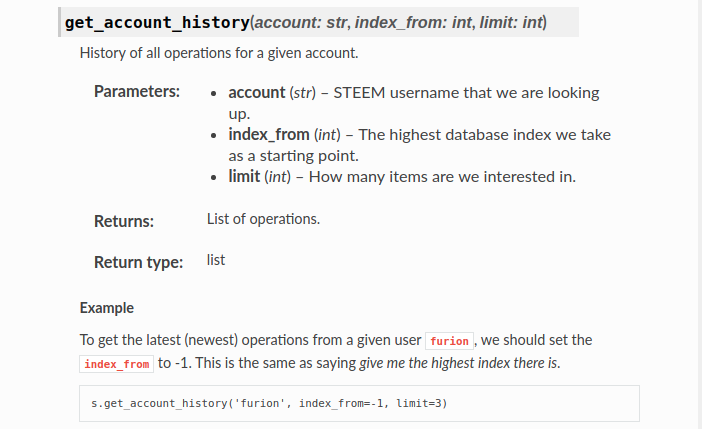
這個method一共要帶入三個參數,分別是帳戶名(Account),第幾個index開始回頭找(index_from),以及**找幾筆**(limit)。如果設定`index_from = -1`,就可以從你最新的一個「動作」開始顯示。我先試運行以下程式:
```
from steem import Steem
import sys
account_name = sys.argv[1]
s = Steem()
history_list = s.get_account_history(account_name, index_from=-1, limit=2)
for history in history_list:
print(history)
```
運行 `python get_post_history.py antonsteemit`結果
```
[13696, {'virtual_op': 0, 'trx_id': 'b6c600612be6dd4c95f463122b1ac16f7bba1d23', 'trx_in_block': 22, 'block': 24825223, 'timestamp': '2018-08-06T08:30:30', 'op': ['vote', {'permlink': 're-growingpower-re-antonsteemit-add-promotion-tags-feature-to-voting-bot-20180801t102655861z-20180806t083028706z', 'weight': 10000, 'voter': 'antonsteemit', 'author': 'growingpower'}], 'op_in_trx': 0}]
[13697, {'virtual_op': 0, 'trx_id': '096be58e4203cf1ec4fa1ab9b07f83dcf7c88732', 'trx_in_block': 0, 'block': 24827058, 'timestamp': '2018-08-06T10:02:27', 'op': ['vote', {'permlink': 'da-series-learn-python-with-steem-07', 'weight': 10000, 'voter': 'antonsteemit', 'author': 'deanliu'}], 'op_in_trx': 0}]
[13698, {'virtual_op': 0, 'trx_id': '7f7ed6618c70fd9a2a5a343dfdb5705286285c8a', 'trx_in_block': 32, 'block': 24827067, 'timestamp': '2018-08-06T10:02:54', 'op': ['comment', {'json_metadata': '{"tags":["da-learnpythonwithsteem"],"app":"steemit/0.1"}', 'body': '怎麼不換成自己的名字勒xD', 'parent_author': 'shine.wong', 'title': '', 'permlink': 're-shinewong-re-deanliu-da-series-learn-python-with-steem-07-20180806t100255317z', 'author': 'antonsteemit', 'parent_permlink': 're-deanliu-da-series-learn-python-with-steem-07-20180806t082310536z'}], 'op_in_trx': 0}]
```
#### 解析
回傳回來會是一個List ,我們來認真觀察一下回傳的資料形式:List的第一個元素是一個數字,其實就是我的**Operation編號**,也就是說我最新一個operation是我在Steem上的第「13698」個動作。再往後滑一點會發現一個名叫`'op' `的key,後面則是一個超級大的List:
```
['comment', {'json_metadata': '{"tags":["da-learnpythonwithsteem"],"app":"steemit/0.1"}', 'body': '怎麼不換成自己的名字勒xD', 'parent_author': 'shine.wong', 'title': '', 'permlink': 're-shinewong-re-deanliu-da-series-learn-python-with-steem-07-20180806t100255317z', 'author': 'antonsteemit', 'parent_permlink': 're-deanliu-da-series-learn-python-with-steem-07-20180806t082310536z'}]
```
這個list之中,第一個元素是個字串,告訴我們這個operation的種類是 `'vote'`,`'comment'`,`'claim_reward'`等等等。在Steem裡面,po文跟回文都算是「Comment」類型,我們可以先透過以下的方法過濾出所有Comment類型的運作,再來慢慢看如何區分**Post** 跟 **Comment**
<br>
```
from steem import Steem
import sys
account_name = sys.argv[1]
s = Steem()
history = s.get_account_history(account_name, index_from=-1, limit=100)
for operation in history:
op = operation[1]['op'] # 取出大List
if op[0] == 'comment':
print(op[1])
```
<br>
```
{'author': 'antonsteemit', 'permlink': 're-revisesociology-the-problem-with-steemit-is-that-it-incentivizes-selfishness-and-passivity-20180805t155524466z', 'parent_permlink': 'the-problem-with-steemit-is-that-it-incentivizes-selfishness-and-passivity', 'parent_author': 'revisesociology', 'json_metadata': '{"tags":["steemit"],"app":"steemit/0.1"}', 'title': '', 'body': "> Overall the platform works much better for investors rather than quality content producers\n\nCan't agree more!"}
{'author': 'antonsteemit', 'permlink': 're-shinewong-re-deanliu-da-series-learn-python-with-steem-07-20180806t100255317z', 'parent_permlink': 're-deanliu-da-series-learn-python-with-steem-07-20180806t082310536z', 'parent_author': 'shine.wong', 'json_metadata': '{"tags":["da-learnpythonwithsteem"],"app":"steemit/0.1"}', 'title': '', 'body': '怎麼不換成自己的名字勒xD'}
{'author': 'shine.wong', 'permlink': 'shine-wong-re-antonsteemit-re-shinewong-re-deanliu-da-series-learn-python-with-steem-07-20180806t100720116z', 'parent_permlink': 're-shinewong-re-deanliu-da-series-learn-python-with-steem-07-20180806t100255317z', 'parent_author': 'antonsteemit', 'json_metadata': '{"app":"partiko"}', 'title': '', 'body': '自己的數值不好看,用你的只要複製黏貼呀,哈哈哈,懶癌晚期不是蓋的\U0001f923\n\nPosted using [Partiko Android](https://play.google.com/store/apps/details?id=io.partiko.android)'}
```
### 細分 Comment種類
這裡印出了最新100個跟我有關的Operation中所有算是Comment類型的東西。我們可以發現有些別人回我們的文也被計算在內了(例如最新一筆是@shine.wong 的回文xD)。由於我最近太少發文了,所以找出來的都是Comment,但是大家可以找找看最近一筆「發文」,拿出來跟一般「回文」比較一下,就可以發現資料結構有些許不同:
在Steem中,儲存一篇comment物件主要由兩個部份組成:**author**以及**permlink**。由這兩個元素就可以定位到任何一個回文或是貼文,可以算是這個物件的「身份證字號」。不信的話現在可以抬頭看看網址列**這篇文章的網址**,也就是steemit.com/後面接上了@author/permlink。不過為了方便定位每一篇回文是在哪篇文章之下,預設的回文都會有另外一個: `parent_permlink`,告訴我們這篇回文是在哪個文章之下,或是在哪個回文的底下。
不過呢,如果是一篇獨立發文,由於不隸屬於任何其他發文之下,因此就不會有`parent_author`了。我們正是要利用這個特性來區別出「發文」與「回文」。因此我們在我們剛剛的迴圈裡面的`if`底下,再加上一個`if`判斷:如果這個物件是comment了,我們就進一步判斷他 `'parent_author'`是不是空白,是的話則代表為發文:
```
history = s.get_account_history(account_name, index_from=-1, limit=1000)
for operation in history:
op = operation[1]['op'] # 取出大List
if op[0] == 'comment':
if op[1]['parent_author'] == '':
print(op[1]['title'])
```
列出來的就會是你最近這1000 (我設定`limit=1000`)個「動作」中,屬於發文的東西了。我們在這裡只印出`op[1]['title']`,也就是每一篇文的標題。執行結果:
```
比利時 2:1 巴西
Russia2018 世足筆記 - 比利時 2:1 巴西
Russia2018 世足筆記 日本不愧亞洲足球之光
Russia2018 世足筆記 令人緬懷的西班牙無敵艦隊
世界盃筆記 - 寫在 比利時 vs 法國 前
世界盃筆記 - 寫在 比利時 vs 法國 前
Russia2018世足筆記 - 寫在 比利時 vs 法國 前
Russia2018 世足筆記 令人敬佩的克羅埃西亞
電影The Big Short :泡沫來臨前夕
一期一會
去中心世界的加解密專家 NuCypher
くら寿司 藏壽司 Kura Sushi - 迴轉壽司來囉 (近台北車站)
```
哎呀,最近發文是不是真的太少了點...
### 搜尋完整的發文紀錄
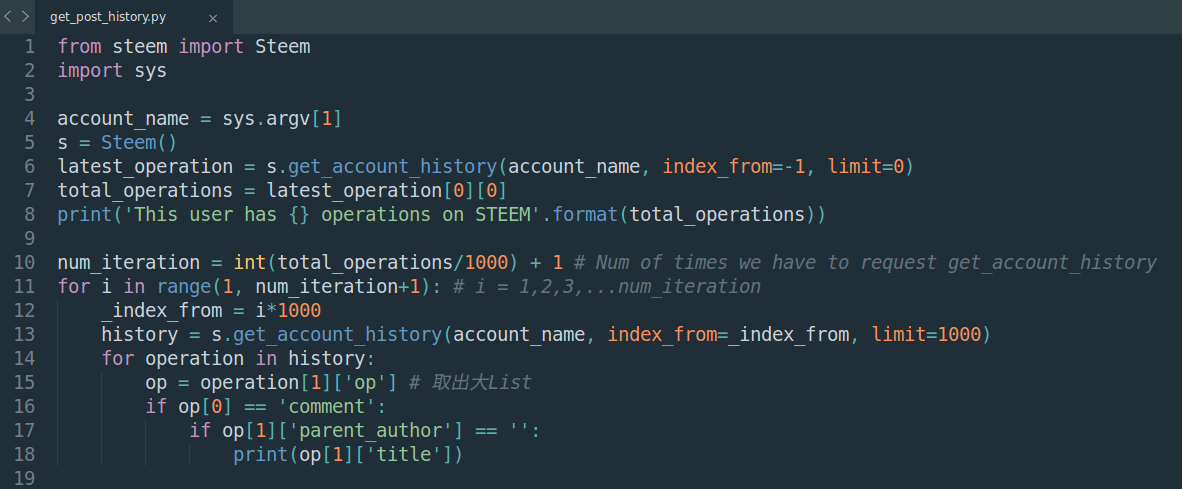
上面的例子中,只有印出最近一千個在Steem上面的動作中的發文項目。就像我一開始在透過觀察最後一個Operation的index,發現我一共已經在Steem上面有13698個Transaction,要重頭獲取所有的紀錄才算是完成吧!但是`get_account_history()`這個method有**限制一個人每次最多只能查一萬筆**,而每個人依據來到平台的先後,也會有不同的transaction數量。所以我們要透過一個簡單的迴圈,每次搜尋1000筆(我覺得1000這數字比較剛好),直到涵蓋要查詢的使用者的所有transaction。
### 去除編輯造成的重複
這樣在搜尋一次,就可以列出從以前到現在所有發文的Title了。但是,大家會發現中間有所重複,為什麼呢?
因為在Steem上面,每次Edit文章都是重新發布一篇新的Comment,不過Permlink或與前者相同,而最終在顯示時會顯示最晚更新的文章內容。所以我們可以透過permlink來去掉這些重複的po文:
首先我們可以先創造一個list用來儲存permlink,每次找到新的一篇文章時,就看看這個permlink是否已經出現過。出現過的話帶表示是重複的更新,所以可以不用理他。如果沒出現過,就把這個permlink加入這個list裡面。最終我們的`permlink_list`就回存滿我們所有發文的permlink啦!程式全貌([get_post_history.py](https://github.com/antoncoding/Python-x-Steem-tutorial/blob/master/steem-python%20examples/get_post_history.py)):
```
from steem import Steem
import sys
account_name = sys.argv[1]
s = Steem()
latest_operation = s.get_account_history(account_name, index_from=-1, limit=0)
total_operations = latest_operation[0][0]
print('This user has {} operations on STEEM'.format(total_operations))
num_iteration = int(total_operations/1000) + 1 # Num of times we have to request get_account_history
permlink_list = []
title_list = []
for i in range(1, num_iteration+1): # i = 1,2,3,...num_iteration
_index_from = i*1000
history = s.get_account_history(account_name, index_from=_index_from, limit=1000)
for operation in history:
op = operation[1]['op'] # 取出大List
if op[0] == 'comment':
if op[1]['parent_author'] == '':
_permlink = op[1]['permlink']
_title = op[1]['title']
if _permlink not in permlink_list:
permlink_list.append(_permlink)
title_list.append(_title)
print('[Title] {}\n [Permlink] {}'.format(_title, _permlink))
print('@{} have authored {} posts on Steemit!'.format(account_name, len(permlink_list)))
```
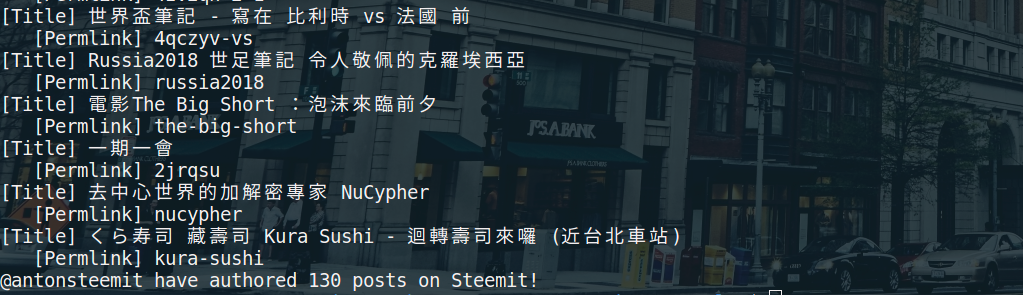
執行後發現我竟然已經發過130篇文了!會不會太勤勞呀~
當然,還要滑到最上面去看一下人生的第一篇發文呀!在這裡給大家參考一下我的Steem初登板喔xD :[A Great Rule to keep in mind for All Crypto Investors](https://steemit.com/cryptocurrency/@antonsteemit/a-great-rule-to-keep-in-mind-for-all-crypto-investors)。現在看覺得真是大言不慚阿~大家也來分享一下自己的第一篇吧。
## 下集預告
今天雖然花了很多時間,卻只找出了所有發文title、permlink的列表。沒關係,下次我們再來延伸今天的程式,把每篇文章的Vote、收益、轉發,全部找出來呀!(各位裝好學生的大神們可以先開始動作了)
<sub>*image - pixabay*</sub>👍 liangfengyouren, bobdos, menshealthblog, joythewanderer, eval, mangoanddaddy, lilanz, ms8988, damarth, syh7758520, team-cn, youandme, eondas, xiaoyuanwmm, ybeyond, weitz, tecire, jerseymikes, chick-fil-a, redlobster, fiveguys, marcoy2j, dealmoon, moonbbs, bonefish, chilis, olive-garden, shuxuan, xiaowucw, new-voices, nozuonodie, yamibuy, bunnymandy, teamcn-weekly, teamcn-news, roy-rogers, wenxuecity, huaren, mitbbs, cn-health, cn-doctors, wongmanman, kissfirer, chann, pgr, china-mobile, wylo, divinetruth, comingback, catwomanteresa, skenan, cathvanlael, julian2013, exec, lindalex, lebin, wongshiying, chinadaily, miguelalar, midnightoil, xiaohui, sweetieprincess, team-leibniz, rynow, victorier, blackbunny, xiaokongcom, laoyao, deanliu, helene, zeekcryptominer, marcoharley1995, winniex, windowglass, sanzo, lkvictor2005, msg768, christianity101, kmart, unimelb, smartbot, opc, uow, ingdirect, oflyhigh, coindzs, somebody, yyyy, cnbuddy, dapeng, yulan, janiceting, blockchainbilly, devilwsy, tvb, luneknight, jkkim, kettleandseagull, shine.wong, lalala, ripperone, lingfei, ethansteem, dgorbunov, davidke20, fr3eze, jidgabol, coinbitgold, that1consultant, btccurrency1, rivalhw, ethanlee, santiagocazorla, lydiachan, jademont, daynewright, cherryng, xiaoshancun, nanosesame, alatomz, olivier10101, lzg, honoru, decayboy, theshadowek, amylee, mrspointm, jingsaiy, skrudge777, aleestra, htliao, geyu, antonsteemit, wentong-syhhae, travelgirl, susanlo, idx, abit, ace108, minloulou, kimxinfo, dudefromsa,