Guide: How to Join EOS Crowdsale on My Ether Wallet & Metamask (Simple & Full Version)
eos·@destalonica·
0.000 HBDGuide: How to Join EOS Crowdsale on My Ether Wallet & Metamask (Simple & Full Version)

Hi Everyone, I will be covering on how to join EOS community during crowd sale, Please do use the search button for faster reference. (Eg: Search for A01, Part A, C03, etc)
Website to note of:
- https://eos.io/ (Original EOS Website)
- https://eosscan.io/ (Distribution Market Status)
- https://etherscan.io/ (Ether Transaction Status Checker)
I will be Covering on
Part A: My Ether Wallet (MEW)
- A01: How to get My Etherwallet Account
- A02: How to Send ETH To EOS Crowdsale
- A03: How to Check Your Transaction Status & Distribution Period you are in
- A04: How to Claim your EOS
- A05: How to View your EOS Balance
- A06: How to Register your Eth Address on MEW
- A07: How to Verify if your ETH address is successfully registered
- A08: How to Cancel Your Transaction
Part B: Metamask
- B01: How to Get Metamask Wallet
- B02: How to Fund your Metamask Wallet
- B03: How to Send ETH to EOS Crowdsale, How to Claim your EOS, How to Register your EOS
- B04: How to View Your EOS Balance on Metamask
Part C: Extra Knowledge
- C01: What's Wallet & Exchange Platform
- C02: EOS Crowdsale vs Exchange
- C03: Community Link
- C04: Danger to look out for
- C05: FAQ
- C06: Personal Opinion & Credit
Now Let's Begin
**Part A: My Ether Wallet**
A01: How to get My Etherwallet Account
> 01: Go to https://www.myetherwallet.com/
> 02: Input your preference Password & note it down; "Your password must be at least 9 characters. Please ensure it is a strong password with Number, Capital Letter & Sign"
https://steemitimages.com/DQmWgRP9vTEd6wbsMVUmi3cEc1qXjFd3X7crSZJUfqnGW5V/a02.png
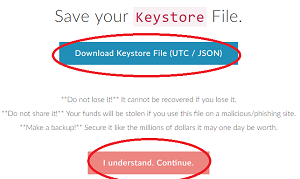
> 03: Download your Keystore & save it somewhere safe. Don't lose it!
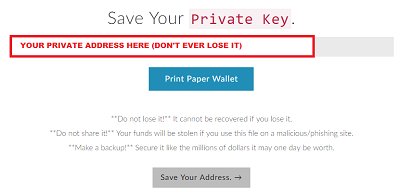
> 04: You will receive your private address, Don't lose it!
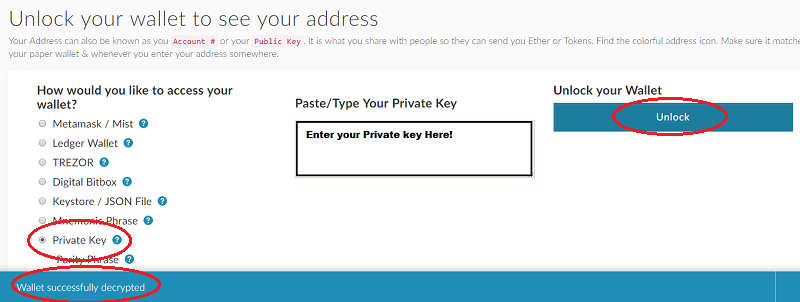
> 05: You can choose on which platform you would like to use your own wallet, for Metamask will be covered in Part B. For now, we will choose "Private Key" and enter your private key you recently received. Once done, Click Unlock!!
Now you have successfully acquire My Ether Wallet Account!
A02: How to Send ETH To EOS Crowdsale
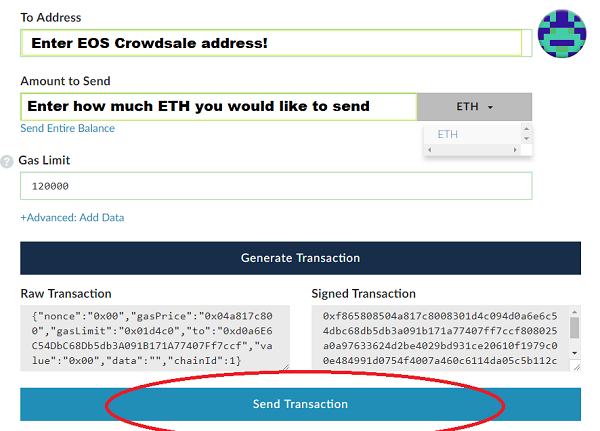
> 01: Now, Select Send Ether & Tokens Tab, we will be sending ETH to Crowdsale. Enter your Private Address & Click Unlock!
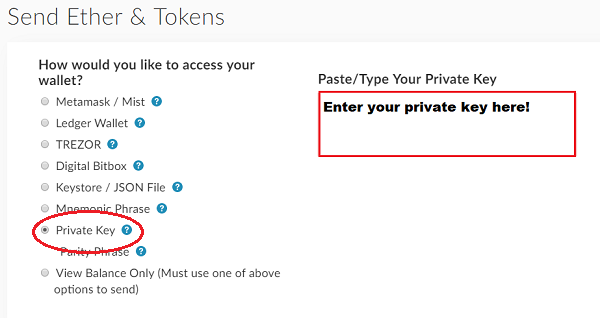
> 02: Go to Eos.io and check EOS Crowdsale address. Once done, input the address into Recipient & Enter how much ETH would you like to send. for Gas Limit, it's recommended 120,000 or more (Do Note: Transaction may take longer due to ETH is jam)
> ( YOU MAY NEED TO INCREASE THE AMOUNT OF GAS LIMIT & GWEI FOR SMOOTHER / FASTER TRANSACTION )
A03: How to Check Your Transaction Status
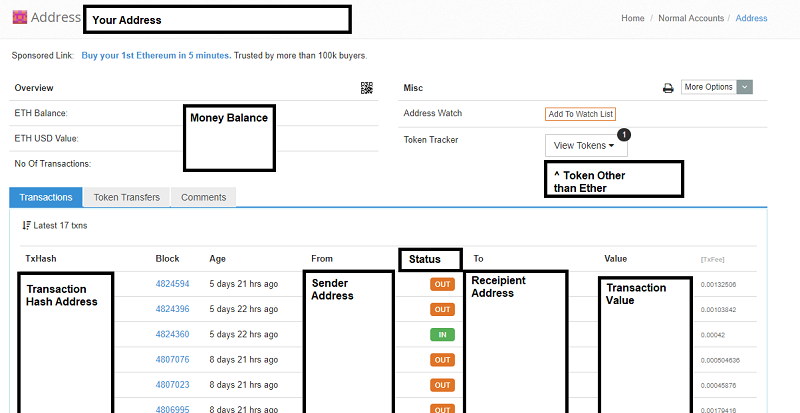
> 01: Go to https://www.myetherwallet.com > Choose View Wallet Info Tab > Select Private key > Enter your Private Key > Unlock > You will See your ETH Address with Private key
> 02: Copy your Wallet Address and go to https://etherscan.io/ Input your Wallet address into Search bar and it will show you your Wallet Status along with the transaction

> 03: You will see your ETH & Other Token Balance and Transaction History
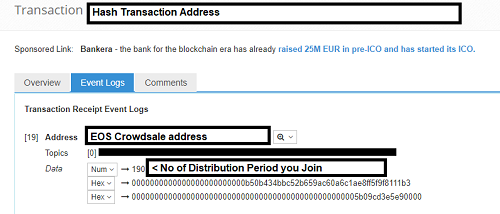
NOTE: FROM HERE IS TO CHECK DISTRIBUTION PERIOD YOU PARTAKE
> 01: Choose Transaction Hash Tx you sent your ETH to CrowdSale. Go to Event Logs Tab, And change the "1ST" Hash Key Into Number
A04: How to claim your EOS
*** YOU CAN ONLY CLAIM ONCE YOUR DISTRIBUTION PERIOD HAS ENDED***
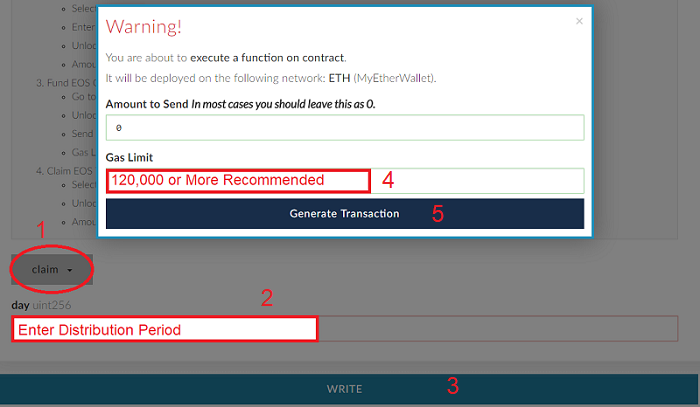
> 01: Visit https://www.myetherwallet.com/ , Under "Select Existing Contract" Choose EOS: Contribution. Afterwards, it will Autofill all the blank details for you & Click Access
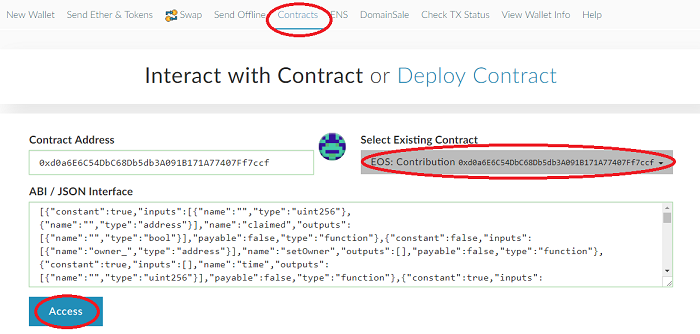
> 02: Filter & Select Claim > Enter your Distribution Period > Click Write > Input 0 ETH > Gas Limit is 120,000 & Above recommended & Click Generate
> ( YOU MAY NEED TO INCREASE THE AMOUNT OF GAS LIMIT & GWEI FOR SMOOTHER / FASTER TRANSACTION )
A05: How to View your EOS Balance
> 01: Go to https://www.myetherwallet.com/#send-transaction
> 02: Enter Your Private key & Unlock
> 03: Add Custom Token
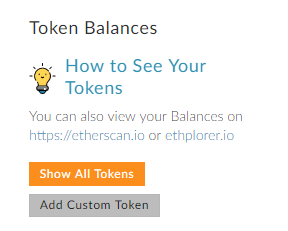
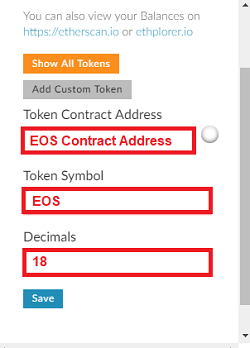
> 04: Add EOS Contract Address ( 0x86fa049857e0209aa7d9e616f7eb3b3b78ecfdb0 ) (From Etherscan.io)
> 05: Enter "EOS" as token Symbol
> 06: Input 18 for Decimals
A06: How to Register your Eth Address on MEW
***It's recommended to Register before EOS goes live to its own Infrastructure . EOS are still using ETH Infrastructure***
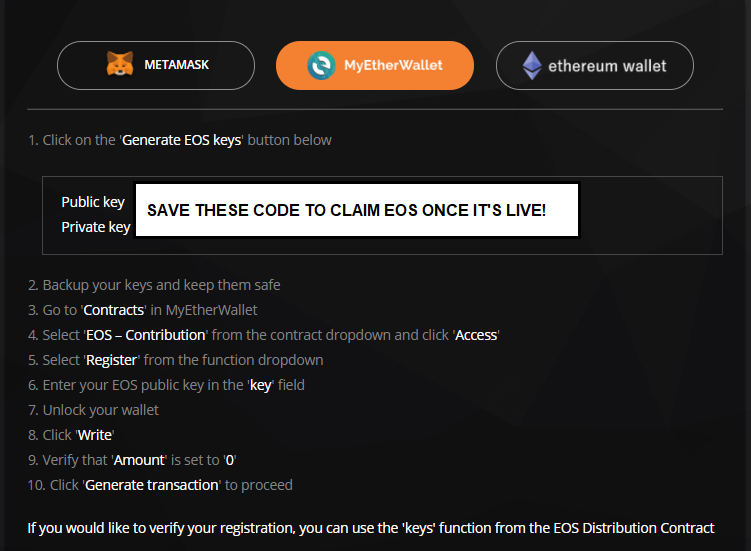
01: Getting Public Key
> Go to eos.io > Get EOS > Click Register > Select My Ether Wallet > Click Generate EOS Key
( Note Down Your Key & Don't Ever lose it, It will be the Address you use to claim EOS)
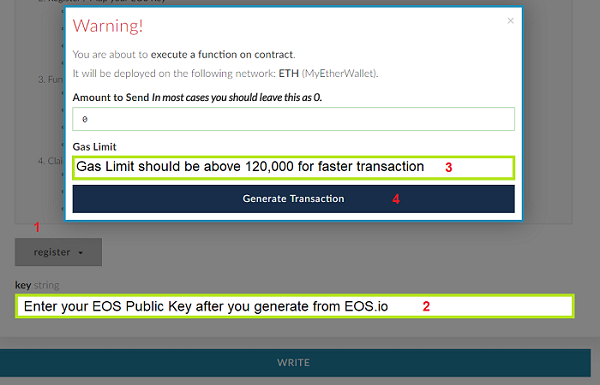
02: Bind your ETH Address with EOS public Key
> Go to https://www.myetherwallet.com/#contracts > Select EOS: Contribution > Click Access > Choose Registration > Unlock your ETH Wallet with Private Key > Input your EOS Public Key > Leave Amount to Sent 0 > Input Gas Limit above 120,000
( YOU MAY NEED TO INCREASE THE AMOUNT OF GAS LIMIT & GWEI FOR SMOOTHER / FASTER TRANSACTION )
A07: How to Verify if your MEW address is successfully registered
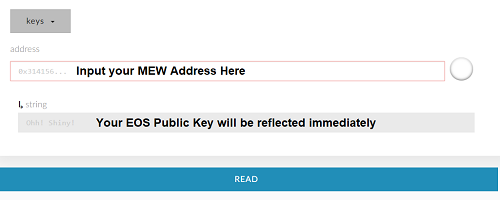
> 01 Go to 'Contracts'
> 02 Select 'EOS - Contribution' from the contract dropdown and click 'Access'
> 03 Select 'keys' from the function dropdown
> 04 Enter your Ethereum public address in the 'address' field
> 05 Click 'Read'
***Your registered EOS public address will be displayed in the 'string' field***
A08: How to Cancel Your Transaction
Read More on https://myetherwallet.github.io/knowledge-base/transactions/check-status-of-ethereum-transaction.html
> 01: Go to https://www.myetherwallet.com/#check-tx-status
> 02: Paste your TX hash.
> 03: If it says pending, you can cancel it
**Part B: Metamask**
B01: How to Get Metamask Wallet
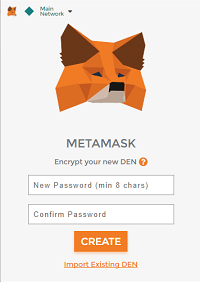
> 01: Go to https://metamask.io/, And download Metamask Extension
> 02: Fox appear on your browser will be Metamask add on 
> 03: Accept the terms & Agreements
> 04: Create Your Own Password
> 05: Save the Phrase key to recover your wallet on Metamask
> 06: Once All done, It will create your ETH Address
B02: How to Fund your Metamask Wallet
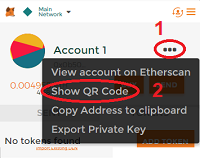
> 01: Login your Address on Metamask
> 02: Click on "..." Icon
> 03: Choose Show QR Code
> 04: That address code will be your ETH Wallet Address
> 05: Sent ETH to Your ETH wallet address
B03: How to Send ETH to EOS Crowdsale, How to Claim your EOS, How to Register your EOS
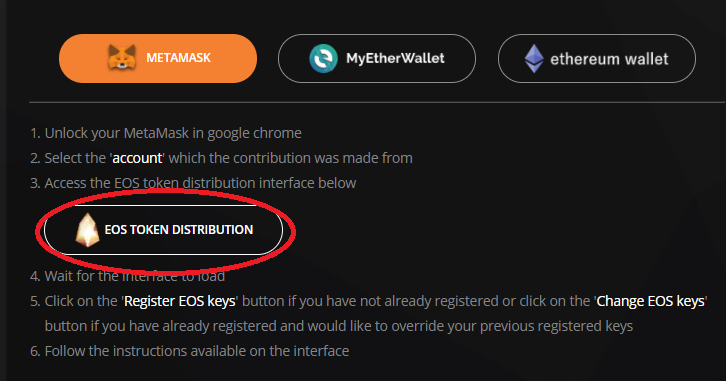
> 01: Visit EOS.io
> 02: Click Get EOS & Accept All the Terms & Agreements
> 03: Click on Register Tab
> 04: Click Metamask
> 05: Click EOS TOKEN DISTRIBUTION
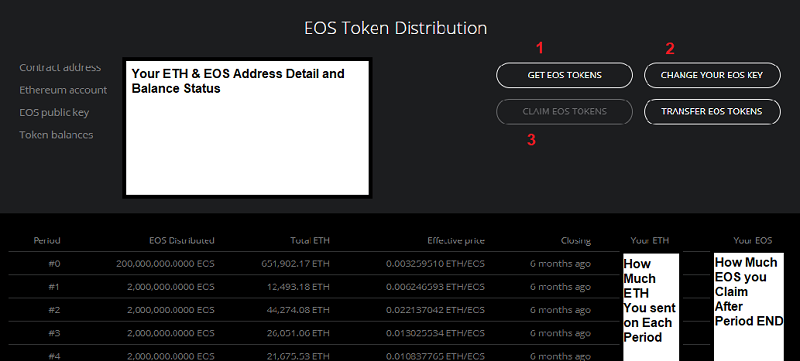
> 06: It will load up to EOS Distribution User Panel Interface
**For All Transfer, It's recommended to input:
( YOU MAY NEED TO INCREASE THE AMOUNT OF GAS LIMIT & GWEI FOR SMOOTHER / FASTER TRANSACTION )
Gas Limit: 120,000 & Above
GWEI: 25 & Above
> 07: Select GET EOS Token To sent your ETH (No 1)
> 08: Select Register Key to Bind your ETH Address with your EOS Public Key (No 2)
(Once Registered, The Option will be changed to "Change your EOS Key")
> 09: Select Claim EOS to Receive your EOS after distribution Period has ended (No 3)
B04: How to View Your EOS Balance on Metamask
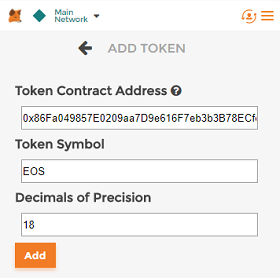
> 01: Login into Metamask Account
> 02: Click Token Tab
> 03: Click Add Token
> 04: Fill up EOS Contract Address ( 0x86Fa049857E0209aa7D9e616F7eb3b3B78ECfdb0 ) (From: etherscan.io)
**Part C: Extra Knowledge**
***DO NOTE, All of this is based on my Opinion, It's an Option to Agree with it***
C01: What's Wallet & Exchange Platform
- Wallet: it is used to store your tokens, You can't exchange your tokens with other currencies/tokens. You can only receive & send. This wallet belongs to you & you must keep it safe. All the Data on your wallet is not saved in centralize server and none can hack your wallet as long none have your private key
- Exchange Platform: This is a trading place where you can store your tokens/currency. You can trade tokens you have with any value exchange has to offer. The exchange will hold your token in their centralized data server for smoother trading. Anyone able to hack/stole your tokens if the Exchange company unable to compromise trust/security adherence.
C02: EOS Crowdsale vs Exchange
EOS Crowdsale: ( Do Check EOSscan.io Website for Contribution Detail )
How Much EOS you claim will be based on How much Contribution community has made in certain Period
Calculation:
How Much ETH/EOS x How much ETH Yo contributed = EOS you will be receiving
>Eg: By END Of Period 108: 1 ETH = 100 EOS
> You have contributed 0.5 ETH, so you will get 100 x 0.5 = 50 EOS
Note to Consider: ETH Price & How much ETH contributed NEARING end of Period
Exchange Platform:
(Do Note: Exchange Platform works like a Bank, It collect massive amount of token & they trade it, it can also trade token that has not released yet)
You can buy EOS based on the Token/Currency exchange offers. It will be on Fix Price & less calculation needed.
List of Recommended Exchange Platform
1. Bitfinex ( Currency to Token )
2. Binance ( Token to Token )
C03: Community Link
Telegram Group
- EOS (English): https://t.me/EOSproject
- EOS (中文): https://t.me/eos_cn
- EOS (한국어): https://t.me/EOSIOKorea
- EOS Talk: https://t.me/eostalk
- EOS Price: https://t.me/EOSPrice
- EOS Developer: https://t.me/joinchat/EaEnSUPktgfoI-XPfMYtcQ
- EOS Trader: https://t.me/EOStraders
- EOS Go by Kev: https://t.me/eosgo_announcements
Forum:
- EOS Go by Kev: https://forums.eosgo.io/
- Github EOS: https://github.com/EOSIO/eos
- Reddit EOS: http://reddit.com/r/eos
C04: Danger to look out for
1. DON'T send to wrong Address during Registration
2. DON'T share your private key
3. Do research on Legitimate of Exchange Platform & Wallet Before you use it.
4. Incorrect Website Address
5. Not legitimate website asking for your address
C05: FAQ
Q: My Ether Transaction has been Pending for Ages!:
A: Cancel your Current Transaction & Redo it by Increasing GAS limit & GWEI
Q: I made a Claim yet I don't Receive my EOS
A: Check if
1. Your period has Ended
2. You enter the correct Period
3. Your Claim Transaction is successful (if Not succesfull, redo it)
4. Only for Metamask: Check if you have selected the correct period, & Clear your Browser Cache, Restart your Browser & Keep refreshing the Page
Q: I sent My EOS to Crowdsale, Can I retrieve back my EOS?
A: There's no way currently for EOS to sent back your token, BUT!!!. Stay Calm & Don't be panic!. There's a chance you can get back your EOS once it goes live.
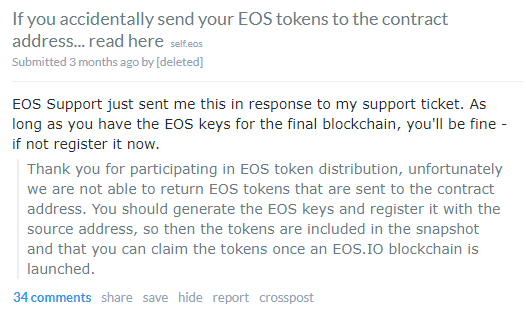
More on: https://www.reddit.com/r/eos/comments/73zc36/if_you_accidentally_send_your_eos_tokens_to_the/
Q: I have participated in EOS Crowdsale distribution, what should I do next?
A: Wait until EOS release on June, meanwhile follow up EOS news on Github, Reddit, and Website for upcoming Features & Invest More!
Q: How many times do I need to Register?
A: One time successful registration will be enough. You can register again if you want to change your EOS public key
C06: Personal Opinion & Credit
In my opinion, EOS will be leading Crypto to a higher place. It will be beneficial to the community. We can hear a lot of promises made by another crypto developer, but I have never experienced and seen one same as EOS. This steemit is developed by Dan Larimer. From the function, and how easy it's to use makes me believe EOS can make it through.
Free Transaction Fee, Reliability, Open source to provide support Dapps written in different languages.
EOS have not alive, yet it has gathered so much of support & contribution from people. EOS admin is also approachable on Telegram at times, & we do help each other which makes the community greater.
On top of All, I am not working under EOS but I am here to Help.
Credits:
- EOS: https://eos.io/
- My Ether Wallet: https://www.myetherwallet.com
- Etherscan: https://etherscan.io/
- Sandw1ch: https://steemit.com/@sandwich
- To all other people who share their knowledge for me to get to know EOS more.