Make social media applications with Flask #1: Design database and initial structure, Following and follower functions
utopian-io·@duski.harahap·
0.000 HBDMake social media applications with Flask #1: Design database and initial structure, Following and follower functions
#### Repository
https://github.com/python
#### What Will I Learn?
- Design database and initial structure
- Make following and follower functions
#### Requirements
- Basic Python
- Install Python 3
- Install Flask
#### Resources
- Python - https://www.python.org/
- Flask - http://flask.pocoo.org/
- Peewee http://docs.peewee-orm.com/en/latest/
- Sqlitebrowser https://sqlitebrowser.org/
#### Difficulty
Basic
### Tutorial Content
Hi everyone, this tutorial I will make something different. I will use the flask to create a social media application that you can later develop. the concept that I will make is not much different from the current social media application. the features that I will make will also be more or less the same. we can do and ***follow, update status, set profile and much more***. We will combine everything we have learned from the flask through my tutorial. So later this tutorial will be divided into several series and I will start this from scratch. For those of you who don't know what flask and python are you can follow my previous tutorial in the curriculum section. okay, we just start this tutorial.
### Database design
The first thing we will do first is to design the database. Of course, before we start creating our social media application, we have to make the basic structure of our database. The concept of the application that we build is similar to the existing social media application. so I plan to make a design list from my database like the following.
- **List table in the database**
We will list first the list of tables and columns that we will use in our application, here is the list:
```
>>> USER
Username
password
email
join_at
>>> MESSAGE
user (foreign key)
content
published_at
>>> RELATIONS
from_user (foreign key)
to_user (foreign key)
```
- **User table**
In the user table we will create ***4 columns*** that will contain data from the user, namely ***Username, password, email, join_at***
- **Message table**
The message table contains content from users in this table, there are ***3 columns***, namely ***user, content, published_at***. **user** will be a ***foreign key*** because later we will join the **user table.**
- **Relations table**
This table contains information about the user's relationship with other users. So generally in social media applications we follow and are followed by friends on social media. This table has ***2 columns*** **from_user** and **to_user**, each of which is a **foreign key**.
<br>
### Structure database
We have made a list and a plan from the database that we are using now we will make a skeleton in our code. I will create a new file with the name **app-social.py**, the following is the basic structure of the database:
```
import datetime
from flask import Flask // import flask
from peewee import * // import peewee
DATABASE = 'tweets.db' // Our database
database = SqliteDatabase(DATABASE)
class BaseModel(): // create base model for table database
class Meta:
database = DATABASE
```
- **Import tools**: We will import two major parts in this application. First, we will import the ***flask*** and for the database part we will use ***peewee***, for those of you who don't know peewee, you can follow my previous [tutorial](https://steemit.com/utopian-io/@duski.harahap/create-a-restful-api-with-flask-2-make-database-migration-interact-database-to-api-insert-data-and-show-data-in-json-1547374394266).
- **Base model:** Because the table that we are going to use is more than one, so it's a good idea to make the base model so that we can use it repeatedly. We can make a base model ```class BaseModel():```.
<br>
- **User model**
The following is the structure of the user model that we will use in our application. **There are 4 columns**.
```
class User(BaseModel):
username = CharField(unique = True)
password = CharField()
email = CharField(unique = True)
join_at = DateTimeField(default=datetime.datetime.now())
```
- ```username = CharField(unique = True)``` **CharField** means that the username column will be of type varchar and will be unique, meaning the value cannot be the same
- ```DateTimeField(default=datetime.datetime.now())``` to make a date time in the database column, we can use ```DateTimeField()``` and the value we can get from ```import datetime```.
<br>
- **Message Model**
Then I will create a message model structure. Here I will make **3 columns**.
```
class Message(BaseModel):
user = ForeignKeyField(User, backref = 'Messages')
content = TextField()
published_at = DateTimeField(default=datetime.datetime.now())
```
- ```ForeignKeyField(User, backref = 'Messages')``` In the table message we will create a foreign key from the User table. we can make it with the ```ForeignKeyField()``` function. The first parameter is the model class that makes the foreign key and the second parameter is ```backref = 'Messages'```.**Messages** is a plural of the message model class.
- ```TextField()``` We use this function to make characters longer than **CharField**.
<br>
- **Model relations**
I will make a model relation, in this model we will use **two columns**, each of which is a foreign key, this table will be responsible for following and unfollow processes.
```
class Relationship(BaseModel):
from_user = ForeignKeyField(User, backref='relationships')
to_user = ForeignKeyField(User, backref='related_to')
class Meta:
indexes = (
(('from_user', 'to_user'), True)
)
```
- We make a foreign key with a different *backref* and I will create the ***Meta class*** to explain the relationship between tables.
- We make **indexes** between **from_user** and **to_user**
``` indexes = (
(('from_user', 'to_user'), True)
)
```
<br>
- **Set database connection**
In the meantime we have finished managing the database structure, now I will set up a connection to the database. for more details, we can see in the section below:
```
import datetime
from flask import Flask
from peewee import *
app = FLASK(__name__)
DATABASE = 'tweets.db'
database = SqliteDatabase(DATABASE)
class BaseModel():
class Meta:
database = DATABASE
class User(BaseModel):
username = CharField(unique = True)
password = CharField()
email = CharField(unique = True)
join_at = DateTimeField(default=datetime.datetime.now())
class Message(BaseModel):
user = ForeignKeyField(User, backref = 'Messages')
content = TextField()
published_at = DateTimeField(default=datetime.datetime.now())
class Relationship(BaseModel):
from_user = ForeignKeyField(User, backref='relationships')
to_user = ForeignKeyField(User, backref='related_to')
class Meta:
indexes = (
(('from_user', 'to_user'), True)
)
//Open connection
@app.before_request
def before_request():
database.connect()
@app.after_request
def after_request():
database.close()
return response
def create_tables():
with database:
database.create_tables([User, Relationship, Message])
```
- **Before request:** I will connect to the database before making a request so I use the function ```@app.before_request``` and use the ```connect ()``` function to connect to the database.
- **After request:** then after making a request we will close the connection in the ```after_request()``` function with ```database.close()```.
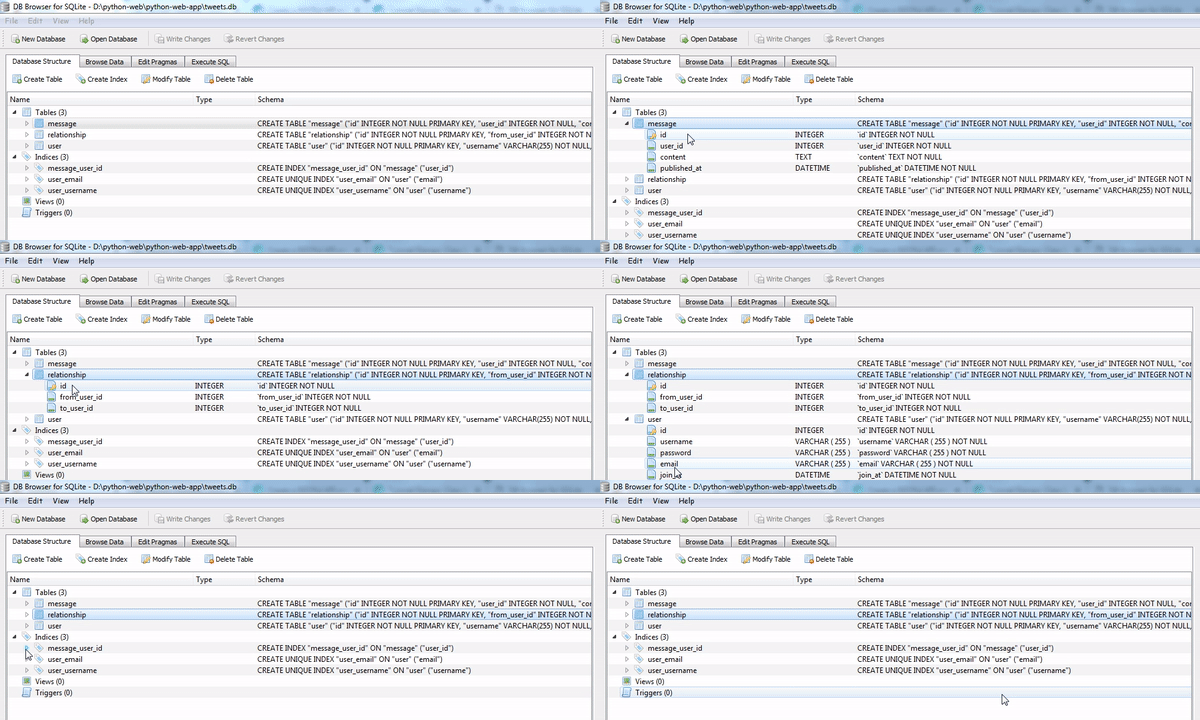
- **Create tables:** After setting the connection we will create a table using the ```create_tables ()``` function. This function has a parameter that contains any model that will be created in the table, here ***we have 3 tables namely User, Message, and Relationship*** ```database.create_tables([User, Relationship, Message])```.
Well, to ***run the create_tables*** function on our application. we can run the function at the **command prompt** like the following:


Automatically, we will get a database file with the extension **.db** to see the contents of the file so we can use one additional tool, **sqlite browser**. you can download it here http://sqlitebrowser.org/. After you have installed it you can open the file as shown below:
.gif)
### Following and followers function
In this section, we will create a function for following and followers of other users on our application. Now, all we have to do is how to make the ***model user*** know about the relationship between one user to another user. So I will make two functions. the first function is for those that ***follow*** and those that are ***followed***.
-**Following function**
```
class User(BaseModel):
username = CharField(unique=True)
password = CharField()
email = CharField(unique=True)
join_at = DateTimeField(default=datetime.datetime.now())
## Following function
def following(self):
return (User.select()
.join(Relationship, on=Relationship.to_user)
.where(Relationship.from_user == self)
.order_by(User.username))
```
- In the following function I will join the Relationship model in the **to_user** column ```.join(Relationship, on=Relationship.to_user)```.
- And use ***where*** to filter users that are the same as **from_user** and **self** ```.where(Relationship.from_user == self)```, I use ***self*** to refer to the contents of the variable in the User model.
- then we order the data based on **username** ```.order_by(User.username)```.
<br>
-**Followers function**
For system followers it is not much different from the different following functions is the perception of users who follow and are followed. For more details, we can see the following code:
```
class User(BaseModel):
username = CharField(unique=True)
password = CharField()
email = CharField(unique=True)
join_at = DateTimeField(default=datetime.datetime.now())
def following(self):
return (User.select()
.join(Relationship, on=Relationship.to_user)
.where(Relationship.from_user == self)
.order_by(User.username))
def following(self):
return (User.select()
.join(Relationship, on=Relationship.from_user)
.where(Relationship.to_user == self)
.order_by(User.username))
```
- In table followers we join in the **from_user** column ```.join(Relationship, on=Relationship.from_user)``` and where in the **to_user** column ```.where(Relationship.to_user == self)``` then order by username on User mode ```.order_by(User.username)```.
And finally we have finished making the basic design and structure of the database that we are going to use, we have also created functions for following and follower features. In the next tutorial, we will create an interface that will connect all the functions that we make into an interface that can be used by the User. thank you for following this tutorial. hopefully, this tutorial can help you..
#### Curriculum
- **Web development with flask**
[Web developement with python #1 : Flask initialization and Routing system](https://steemit.com/utopian-io/@duski.harahap/web-developement-with-python-1-flask-initialization-and-routing-system-1542726589553)
[Web development with python #2 : Templating jinja2 and Method POST on routing system](https://steemit.com/utopian-io/@duski.harahap/web-developement-with-python-2-templating-jinja2-and-method-post-on-routing-system-1542987551736)
[Web development with python #3 : Get method, Query parameter and Navigate Routing](https://steemit.com/utopian-io/@duski.harahap/web-developement-with-python-3-get-method-query-parameter-and-navigate-routing-1543411189705)
[Web development with python #4: Store cookie and Get cookie in template](https://steemit.com/utopian-io/@duski.harahap/web-development-with-python-5-store-cookie-and-get-cookie-in-template-1543593496200)
[Web development with python #5: Web development with python #5 : Session in flask and Login and Logout system](https://steemit.com/utopian-io/@duski.harahap/web-development-with-python-5-session-in-flask-and-login-and-logout-system-1544025770372)
[Web development with python #6 : Use flash message and combine it with framework boostrap](
https://steemit.com/utopian-io/@duski.harahap/web-development-with-python-6-use-flash-message-and-combine-it-with-framework-boostrap-1544447442022)
<br>
- **File in python**
[File in python #1 : Read file and Write file and Modes file](https://steemit.com/utopian-io/@duski.harahap/file-in-python-1-read-file-and-write-file-and-modes-file-1545409995736)
[File in python #2 : The interaction between user input, Read CSV file](https://steemit.com/utopian-io/@duski.harahap/file-in-python-2-the-interaction-between-user-input-read-csv-file)
[File in python #3 : Write CSV file, Read and Write JSON file](https://steemit.com/utopian-io/@duski.harahap/file-in-python-3-write-csv-file-read-and-write-json-file-1545728394220)
<br>
- **Class-based views**
[Tutorial Django - Class based views #1 : Installation and configuration Django, Using a template system](https://steemit.com/utopian-io/@duski.harahap/django-tutorial-class-based-view-1-installation-and-configuration-django-using-a-template-system-1545837443632)
[Tutorial Django - Class based view #2 : Use Class based view method and Get and Post method](
https://steemit.com/utopian-io/@duski.harahap/django-tutorial-class-based-view-2-use-class-based-view-method-and-get-and-post-method-1546448948207)
[Tutorial Django- Class based view #3 : Authentication in Django and Urls Protection globally and specifically](
https://steemit.com/utopian-io/@duski.harahap/django-tutorial-class-based-view-3-authentication-in-django-and-urls-protection-globally-and-specifically-1546614192675)
#### Proof of work done
https://github.com/milleaduski/python-web-app👍 jadabug, hdu, votes4minnows, ezravandi, stmpay, optimizer, steemexpress, bluesniper, road2horizon, steemitri, mercadosaway, viperblckz, luc.real, amosbastian, espoem, jaff8, adamada, ascorphat, codingdefined, ulockblock, mops2e, aleister, shammi, leir, dedicatedguy, mcfarhat, pataty69, enlighted, duarte9sousa, munhenhos, bhaski, tiagoferezin, arcange, raphaelle, midun, scipio, miniature-tiger, properfraction, bachuslib, steem-ua, mvanyi, jjay, ryuna.siege, bejust, feronio, progressing, utopian-io, tombstone, jga, kikeven322,