Draft: Unique Writing Technology
technology·@jrswab·
0.000 HBDDraft: Unique Writing Technology
 Today we are mixing my two loves, technology and writing, with a review and introduction to [Draft](https://draftin.com), a great way to allow edits to your work without the need to worry about losing content in the proofreading stage. Think Git and GitHub for authors and bloggers. Nate, the creator of Draft, says it well on the About page: > You don't need writing software; you need someone's feedback on your writing. You don't need version control software; you need to find all the things you've written without fear. You don't need distraction-free text editors; you need to find ways to write more concisely, more clearly. You don't need real time collaboration software; you need a bigger audience for your writing. I'm working on Draft to provide what you need. What I need. We need to be better writers. -[Nate](https://twitter.com/natekontny) Nate is absolutely correct in his statements. When I discovered Draft I was on the verge of uploading all my writing to GitLab's private [Git](https://steemit.com/technology/@jrswab/git-and-utopian-io-incensing-open-source) servers. All because I wanted a version control system to better track my changes and allow for others to edit my work. Using Git would let the editors make all the changes they wanted, and I would see the differences after they made a pull request. Draft fills that need for me one hundred percent with many more features I came to love. A big plus for me moving to this online service, on top of the version control, was how it has [Markdown](https://steemit.com/education/@jrswab/html-and-markdown-formatting-in-the-flow) built in by default. This allows me to stay in the [flow](https://steemit.com/education/@jrswab/how-to-breakthrough-mental-blocks-into-flow) and format my blogs at the same time. A small but huge selling point for me. Granted, we can type in Markdown anywhere, but Draft will show the desired outcome in "view" mode. ## Features ### Version Control The reason I was debating on moving my writing into Git was due to how the big players like Google Docs made it cumbersome to see who changed what. And other sites that rendered Markdown had no way to see edits at all. This is why Draft has a deep spot in my heart now. When we create a new document on Draft we control the main copy of the work. The site gives us a unique share link that we can give out to any person we trust to edit our writing. The editor then logs into their Draft account and is able to change anything at will. 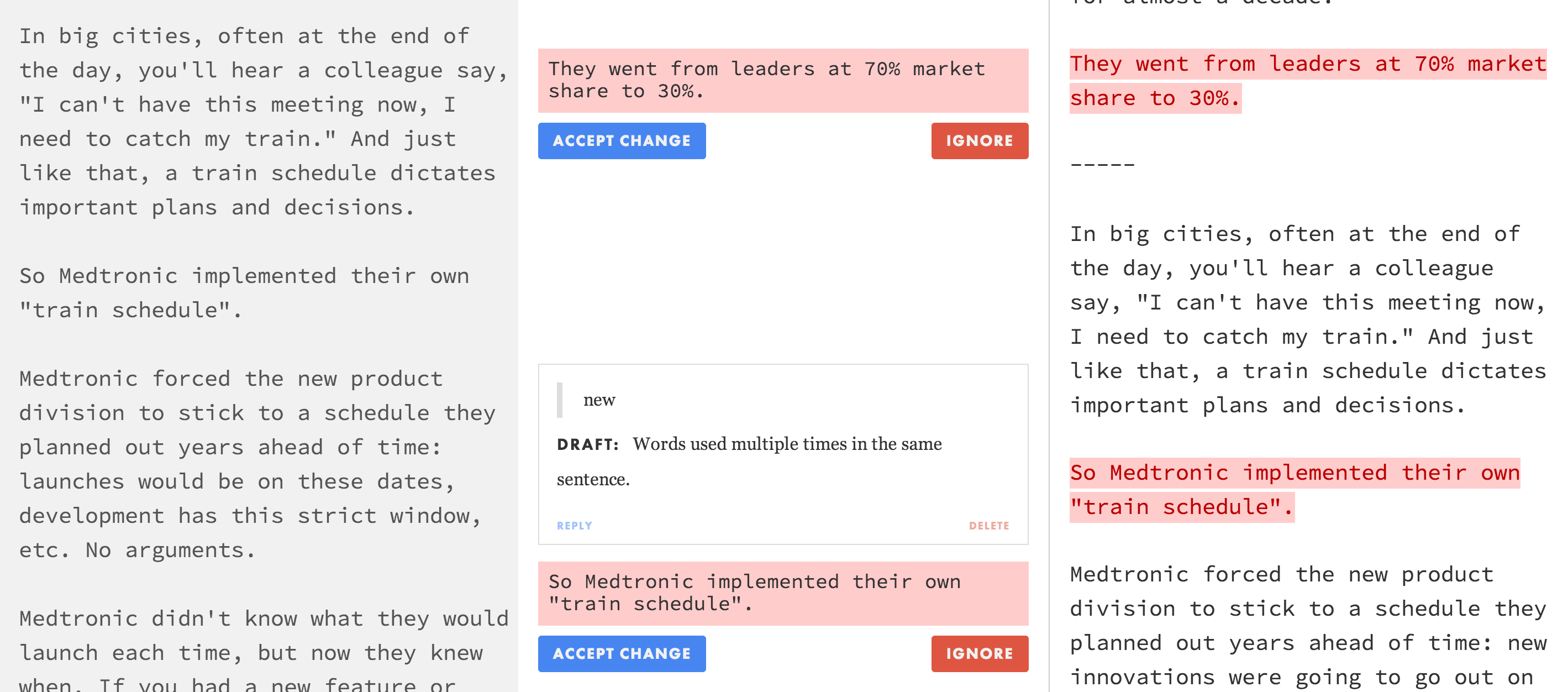 *from Draftin.com* However, these changes are not on your main document, but on a new copy for the editor. Once the editing process is complete, they submit the edits and we see the option to compare our copy with the edited copy. We are able to pick and choose what we want to include, or click the button to accept all the changes. ### Hire a Copy Editor There are a group of people on the Draft platform that will edit and proofread your writing for a few dollars. Simply click the "Ask A Professional" button and a copy is sent off for review. The process then continues as above, allowing us to pick and choose what edits we want to keep. ### Edit History With Draft we are also able to go back in time to see previous versions of our work. As stated above, Google Drive and iCloud have not made this easy for us. We can even tell the site when to make a Draft copy. This is great if we have an idea we want to work out, but also want to keep the original intact in case we choose to ditch the new idea. We can compare each draft we make in the same way we would an editor's copy of our work. The draft will show up on the right and our current version on the left, with all changes listed in the middle. Deletions are highlighted in red and all additions to the work are highlighted in green. ### Import Documents From 'The Cloud' Draft lets us upload content we created on other sites to their platform. This is a syncing process and any changes you make to the document will be uploaded to the other cloud service as well. > For example, start a blog post on the bus with Evernote, then sit down at home and use Draft to complete your blog post and get feedback. You'll always have that complete copy back in your Evernote account. 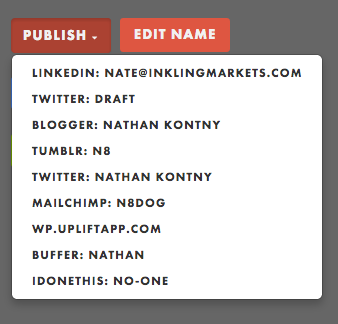 *from Draftin.com* ### Push Content With Two Clicks We can sign in to our favorite sites with Draft and give it permission to post as us. This means that when we are finished with the post, all we need to do is click 'publish,' followed by the site we want to publish the content to. At the time of writing this, it is not an option to publish to Steem, but we can always make our voice heard. There is the ability to use WebHooks, so this may be a project I start in order to allow for direct Steem publishing from Draft. ### Email Draft The site gives you a secret email address for your account that you can send an email to. This works much in the same way that emailing Evernote does. Send an email with some new idea or a few lines that popped into your head and it is in Draft for you to work on later. It even adds any images you include in your email. ### Audio And Video Transcriptions When creating a new document in Draft, there is a drop down menu that includes a lot of other formats. It is there that we find the option to transcribe a video or audio file. After uploading the file, Draft gives us controls to move around the file and even loop a section to make sure we get it all word for word. This is a great tool for any podcaster that wants to turn their spoken content into a traditional blog format. ## That's Not Even All Of It There is still so much more that [Draft](https://draftin.com) can do, and the developer adds to it all the time. He is a writer that is filling his own needs and they happen to be the same needs many of us have as writers. This site has been a pleasure to use and has saved me a lot of hassle in the editing process. (Big thanks to @lenadr and @geke for signing up and using this with me!) To see the full list of features, head over to the [Draft documentation section](http://docs.withdraft.com) of the site and let your writer nerd run free. ## Thanks for reading! Let me know in the comments if you have any questions. or found a typo! ###### *All images came from royalty and attribution free sources unless specified*
👍 terenceplizga, fingersik, nristen, rambai, msp-lovebot, kslo, negativer, spectrums, sndbox, shaff.aff, world-travel-pro, lgm-1, mindfreak, hansikhouse, voronoi, sandbox, erb, indiantraveller, coquiunlimited, leotrap, somethingburger, animagic, idlebright, tinypaleokitchen, jeffbernst, djlethalskillz, spatel, technology-trail, jonknight, jayna, naquoya, jasonbu, abir20129, geke, homoludens, exitmass,