[JAVA #15] [Web Automation #15] Selenium With TestNG #4 @DataProvider annotation [CN]
hive-101145·@june0620·
0.000 HBD[JAVA #15] [Web Automation #15] Selenium With TestNG #4 @DataProvider annotation [CN]

image source: [pixabay](https://pixabay.com/)
---
续上期继续探索TestNG的 annotation。
在自动化测试最重要的一个就是数据测试,叫‘数据驱动’测试。
假如在百度搜索搜索关键词,搜索国家名应显示相关国家信息,输入汇率应显示汇率转换器等。
幸好业界很多自动化测试工具都支持‘数据驱动’测试。
TestNG也不例外,可以用`DataProvider` 这个 annotation 来简单实现。不知道该功能的时候,我是用自己写的循环句来实现‘数据驱动’。但现在好了,有更好的方法可以实现了。
装载`@DataProvider` annotation函数必须返回`Object[][]` 或者 `Iterator<Object>`。
属性 `name` 与 `@Test` annotation的 `dataProvider` 属性相连。
下列例子是我用 `@DataProvider`来反复查询。<sub>(不经当事人同意乱使用了steemian的名字,请见谅,如需要删除请回帖,谢谢 ^^)</sub>
```
@DataProvider(name = "steemians")
public Object[][] members() {
return new Object[][] {
{"annepink"},
{"gghite"},
{"lucky2015"},
{"honoru"},
};
}
```
`@Test` annotation的 `dataProvider` 属性与 `@DataProvider`的 `name` 属性值必须一致才可以正常获取steemian名。最后把数据传到函数内即可搜索。
```
@Test(description = "搜索steemian。", dataProvider = "steemians")
public void CASE_04_Search(String name) {
driver.get(baseUrl + "/@" + name);
/*
* Some actions
*/
}
```
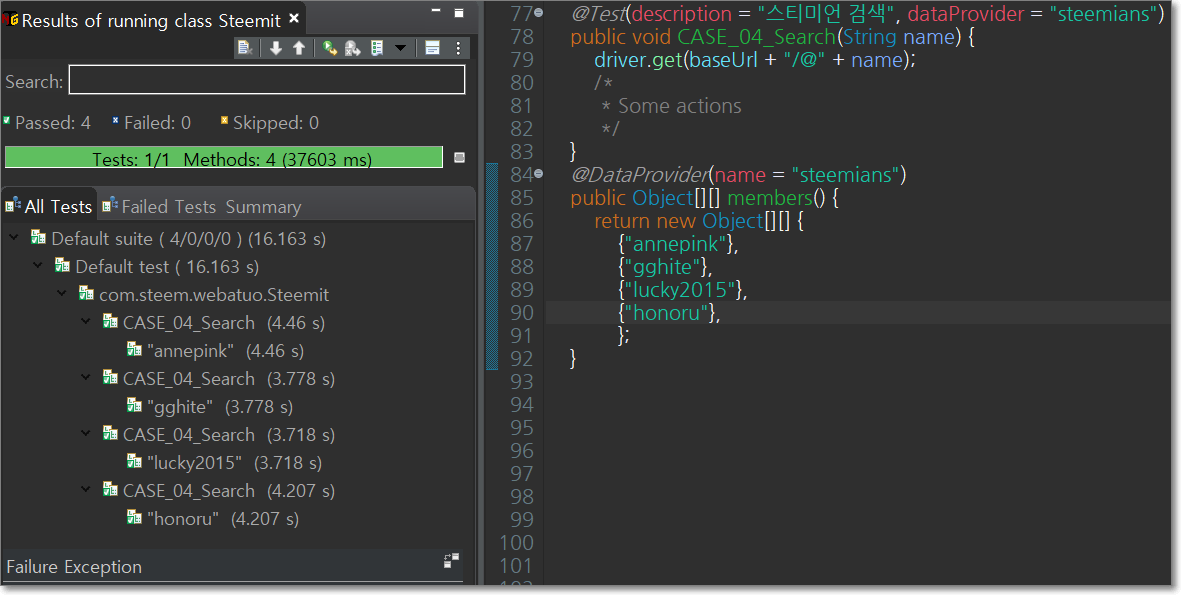
运行后的报告也很完美。
**Sources:**
```
package com.steem.webatuo;
import static org.testng.Assert.assertEquals;
import static org.testng.Assert.assertNotNull;
import static org.testng.Assert.assertTrue;
import java.util.List;
import java.util.concurrent.TimeUnit;
import org.openqa.selenium.By;
import org.openqa.selenium.Keys;
import org.openqa.selenium.WebDriver;
import org.openqa.selenium.WebElement;
import org.openqa.selenium.chrome.ChromeDriver;
import org.testng.annotations.AfterClass;
import org.testng.annotations.BeforeClass;
import org.testng.annotations.DataProvider;
import org.testng.annotations.Test;
import io.github.bonigarcia.wdm.WebDriverManager;
public class Steemit {
WebDriver driver;
String baseUrl = "https://steemit.com";
@BeforeClass
public void SetUp() {
WebDriverManager.chromedriver().setup();
driver = new ChromeDriver();
driver.get(baseUrl + "/@june0620/feed");
driver.manage().window().maximize();
driver.manage().timeouts().implicitlyWait(3, TimeUnit.SECONDS);
}
@Test(enabled = false, description = "获取文章列表。")
public void CASE_01_GetPosts() {
List<WebElement> list = driver.findElements(By.xpath("//div[@id='posts_list']/ul/li"));
assertTrue(!list.isEmpty(), "确认是否显示列表。");
for (WebElement post : list) {
String title = post.findElement(By.xpath("descendant::h2/a")).getText();
String author = post.findElement(By.xpath("descendant::span[@class='user__name']")).getText();
System.out.println(author + "的文章: " + title);
}
}
@Test(timeOut = 60000, description = "登录。")
public void CASE_02_Login() throws InterruptedException {
// Click the login button
driver.findElement(By.linkText("login")).click();
// type id
driver.findElement(By.name("username")).sendKeys("june0620");
// type pw and submit
WebElement pw = driver.findElement(By.name("password"));
assertNotNull(pw, "确认是否显示密码元素。");
pw.sendKeys(Password.getPw());
pw.submit();
Thread.sleep(5000);
}
@Test(description = "撰写文章。")
public void CASE_03_Write() throws InterruptedException {
// Click the write Button
List<WebElement> writeBtns = driver.findElements(By.xpath("//a[@href='/submit.html']"));
assertEquals(writeBtns.size(), 1, "确认是否显示撰写按钮。");
for (WebElement writeBtn : writeBtns) {
if (writeBtn.isDisplayed()) {
writeBtn.click();
Thread.sleep(2000);
// type Text and Keys
WebElement editor = driver.findElement(By.xpath("//textarea[@name='body']"));
String keys = Keys.chord(Keys.LEFT_SHIFT, Keys.ENTER);
editor.sendKeys("hello!! world", keys, "hello!!! STEEMIT", Keys.ENTER, "안녕, 스팀잇", Keys.ENTER, "你好!似提姆");
break;
}
}
Thread.sleep(5000);
}
@Test(description = "搜索steemians。", dataProvider = "steemians")
public void CASE_04_Search(String name) {
driver.get(baseUrl + "/@" + name);
/*
* Some actions
*/
}
@DataProvider(name = "steemians")
public Object[][] members() {
return new Object[][] {
{"annepink"},
{"gghite"},
{"lucky2015"},
{"honoru"},
};
}
@AfterClass
public void tearDownClass() {
driver.quit();
}
}
```
**演示视频:**
[https://youtu.be/UQSlN4KlgRs](https://youtu.be/UQSlN4KlgRs)
.
.
.
.
[Cookie 😅]
Seleniun java lib version: 3.141.59
java version: 13.0.1👍 dblogvoter, gamezine, reward.tier2, mustard-seed, jaydih, kimseun, kanadaramagi123, loveecho, angelslake, wordit, sj-jeong, wondumyungga, aquawink, ringit, coreabeforekorea, talkative-bk, whatdidshewear, sjgod4018, perrymine, jaykayw, ew-and-patterns, pagliozzo, roseofmylife, morningcare, harkar, itchyfeetdonica, kimzwarch, mehta, stupid, unpopular, mys, tipu, magicmonk, whd, cnbuddy, beleg, mightypanda, wherein, mia-cc, bcm, dappstats, tumutanzi, holoz0r, coldhair, lindalex, fego, andrewma, wanggang, changxiu, cherryzz, steemfriends, tina3721, andyhsia, cnbuddy-reward, real3earch, bilpcoinpower, slowwalker, oldstone, angelinafx, suonghuynh, smartvote, oldstone.sct, springflower, mychoco, csy, roguewriter, lotusofmymom, we-together, pilimili, minigame, mini.sct, lucky2015, photoholic, wisdomandjustice, steem-agora, p-translation, steemstatistics, sbdraffle, swiftbot, freegon, virus707, banjjakism, maikuraki, jjm13, zzan.hmy, florianopolis, suhunter, cn-sct, payroll, ilovemylife, zzangu, seo70, marsswim, nineteensixteen, udabeu, freegon.sct, jack8831, djusti, lovequeen, ramires, allsale, sindong, ffcrossculture, mailporpor1, gghite, rudyardcatling, june0620, cyberrn, sct.curator, sct.krwp,