How to install Robo 3T (formerly known as Robomongo) on Linux/Ubuntu
linux·@kennethpham·
0.000 HBDHow to install Robo 3T (formerly known as Robomongo) on Linux/Ubuntu
When you install Robo3T on Windows or Mac, you can have program icons to launch the app, unfortunately you don't have that luxury on Linux, in particular my case, Ubuntu MATE 16.04 LTS. Googling for a while but could not find anything good enough. I decided to combine multiple sources to this writeup:
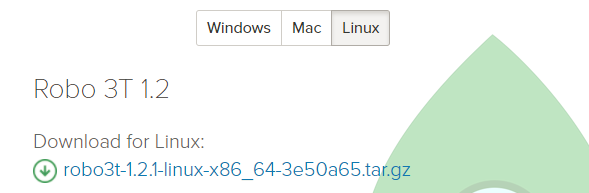
* Goto Robo 3T website [*https://robomongo.org/download*](https://robomongo.org/download), click *Download Robo 3T*, select *Linux* tab, and download the *tar.gz* file to your home's *Downloads* folder:
* Open *Terminal* program, navigate to the *Downloads* folder, and *untar* the newly downloaded file:
```
cd ~/Downloads
tar -xzf robo3t-x.x.x-linux-x86_64-xxxxxxx.tar.gz
```

* Rename the Robo 3T folder to just *robo3t*:
```
mv robo3t-x.x.x-linux-x86_64-xxxxxxx robo3t
```
* Google an icon for Robo 3T, I used this [128x128 PNG](https://www.google.com/search?q=robo3t+icon&source=lnms&tbm=isch&sa=X&ved=0ahUKEwjKpoj-2cnaAhUkzIMKHQ0ACzcQ_AUICigB&biw=1920&bih=949#imgrc=rblfFWmHnFkGcM:), and save it to your *~/Downloads/robo3t* folder as *robo3t.png*

* Move the *robo3t* subfolder from *~/Downloads* to */opt*:
```
sudo mv robo3t /opt
```
* Link the *robo3t* executable to CLI command *robo3t*:
```
sudo ln -s /opt/robo3t/bin/robo3t /usr/bin/robo3t
```
* Create an Unity desktop file for your launcher: I used *nano* command to create new file called *robo3t.desktop* underneath this folder *~/.local/share/applications*:
```
nano ~/.local/share/applications/robo3t.desktop
```
* and enter the following lines (then press *Ctrl+X*, select *Y*, and hit *Enter* to save the file)
```
[Desktop Entry]
Encoding=UTF-8
Name=Robo 3T
Exec=robo3t
Icon=/opt/robo3t/robo3t.png
Terminal=false
Type=Application
Categories=Development;
```
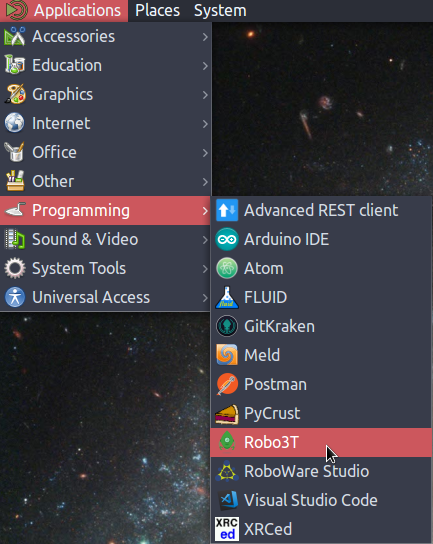
* Now Robo 3T can be found under Applications' Development and/or Programming Category, select its icon to launch the app.
Happy coding!👍 policy101, policy102, policy103, policy104, policy105, policy106, policy107, policy108, policy109, access100, access101, access102, access103, access104, access105, access106, access107, access108, access109, peer100, peer101, peer102, peer104, peer105, peer106, peer107, peer108, peer109, ipsec100, ipsec101, ipsec102, ipsec103, ipsec104, ipsec105, ipsec106, ipsec107, ipsec108, ipsec109, pppoe100, pppoe101, pppoe102, pppoe103, pppoe104, pppoe105, pppoe106, pppoe107, xilang, xilang1, xilang2, xilang3, xilang4, xilang7, xilang8, dolang, dolang1, dolang2, dolang3, dolang4, dolang5, dolang8, dolang9, dolang10, dolang11, dolang12, huhuya, huhuya1, huhuya2, huhuya3, huhuya4, huhuya5, huhuya6, huhuya7, huhuya8, huhuya9, huhuya10, huhuya11, huhuya12, huhuya13, huhuya14, huhuya15, huhuya16, huhuya17, huhuya18, huhuya20, huhuya21, huhuya22, huhuya23, huhuya24, huhuya25, huhuya26, huhuya27, huhuya28, huhuya29, huhuya30, hucat, hucat1, kennethpham, thetroublenotes, skiffer13, likun,