Introducing mcBOT v0.1 to steemit and discord community
utopian-io·@nawab69·
0.000 HBDIntroducing mcBOT v0.1 to steemit and discord community
#### Repository
https://github.com/nawab69/mcbot
### New Projects
#### Description
mcBOT is a Discord BOT which shows statistics of any steemit post. Its full name is mr. COUNTER BOT. Currently it shows this three information.
- Total Words
- Total Characters
- Total Upvotes
When a user send any steemit post/article link to DISCORD channel or DM to mcBOT, The bot reply the statistics of total words, characters and upvotes. It will help the all the steemit community of discord. It will also help those community who arrange article writing contest.
<div align="center">

</div>
### DOCUMENTATION
#### Requirements
- NodeJS
- DiscordJS Module
- Request Module
- [STEEMTOOLS API](http://github.com/nawab69/steemtools-api)
- Text Editor
- Server
#### Installations
- Open Terminal / CMD
- Install NodeJS
``apt install nodejs``
- Install Git
``apt install git``
- Create Directory
``mkdir mcbot``
- Go to mcbot folder
``cd mcbot``
- Clone this repository
``git clone https://github.com/nawab69/mcbot.git``
- Change the directory to bot directory.
``cd mcbot``
- Install modules from package json
``npm install``
- Or manually install all modules.
- Install NodeJs Module
``npm install nodejs --save``
- Install DiscordJS Module
``npm install discord.js --save``
- Install Request Module
``npm install request --save``
#### Customization
- Open ``app.js`` with any text editor.
- Edit The last line of ``app.js``
Uncomment this line
```
client.login("client secret");
```
Write your client secret into the ``""``
Comment/Delete the last line.
#### Run the bot
Write down this code on terminal
```
node app.js
```
Now add your bot from discord developer.
*Follow this guide if you want to deploy your bot from heroku server*
https://medium.com/@mason.spr/hosting-a-discord-js-bot-for-free-using-heroku-564c3da2d23f
**[app.js (all codes are well commented) ](https://github.com/nawab69/mcbot/blob/master/app.js)**
#### Command
- Sent any steemit Post link to your Discord chanel or DM to mcbot.
- It will return your steemit post's
- Total Words
- Total Characters
- Total Upvotes
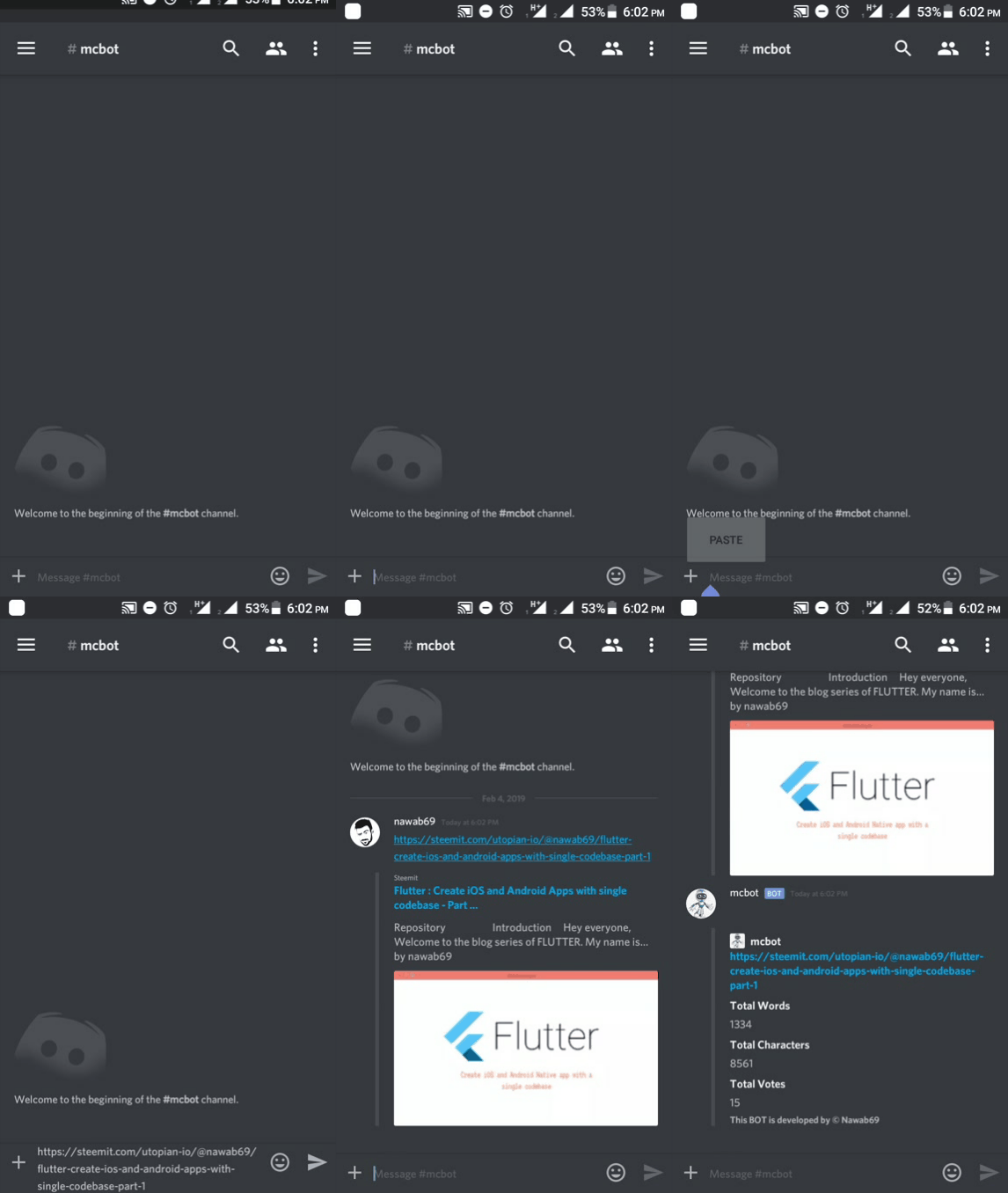
### Use mcBOT Bot without server
- Invite mcBOT to your chanel by this [link](https://discordapp.com/oauth2/authorize?client_id=541498419672383509&permissions=522304&scope=bot)
### Technology stack
I have used ``nodejs`` and ``discord.js`` for build this BOT. I have also used my own steemtools API to collect data. I have used ``request`` module for get data from API. I have used heroku for deploying this bot directly from github.
### Roadmap
My future plan for this bot is adding more functions. Normally its a counter bot. It displays the total words, characters & upvotes. In future, I will add some more command to display this separately. I also want to bring This bot to steemit blog. When A user post in a specific categories, the bot replied with total words and characters. This bot can help the contest creators to counting total words.
- Add More commands
- Bring it in steemit Comment BOT
### How to contribute
This is an open source DISCORD Bot. Anyone can contribute in this bot by simply fork in mcbot github repository.
Contributors may get reward for their contribution.
### Donation
You can Donate me for this BOT
STEEMIT : @nawab69
Ether(ERC-20) : 0xc2c8e307c5c0f33eab27a95c7c2e029234732a9a
### Github Profile
https://github.com/nawab69👍 supu, boyanpro, amosbastian, rufans, espoem, jaff8, asaj, bluesniper, codingdefined, ascorphat, ulockblock, leir, mcfarhat, astronomyizfun, lisa.palmer, cmp2020-lite, remlaps-lite, rgkmb, rgkmb-unofficial, cub2, remlaps2, cmp2020, remlaps1, cub1, amigareaction, mvanyi, deepjsarma, properfraction, roy2016,