How to Mine Steem [07/2017]
steem·@qipashuo·
0.000 HBDHow to Mine Steem [07/2017]
 I was trying to set up a miner today by following links in [steem center](https://www.steem.center/index.php?title=Setting_up_a_Miner). But the information is so out of date. All the tutorials I've found so far are a year old. So decided to compile a tutorial applicable to 07/2017 and onwards. # tl;dr **Windows binaries no longer work. Need to set up ubuntu virtual machine to do so.** Tried out the windows one, definitely not working. Looks like the binary is too old. After the hard fork during 01/2017, the binary does not seem to work any more. The [instructions on ubuntu 16.04](https://steemit.com/miner-category/@clayop/steem-miner-setup-in-ubuntu-15) is also out of date. You might hit some python dependency failures as the source has upgraded to use python3. # Latest Instructions on 07/2017 ## Set up Ubuntu VM on Windows * Download and install [VMware Workstation 12.5.7 Player for Windows 64-bit Operating Systems](https://my.vmware.com/en/web/vmware/free#desktop_end_user_computing/vmware_workstation_player/12_0) * Download [Ubuntu 16.04 Server 64 Bit](http://releases.ubuntu.com/16.04/) * Open VMware Player * Press Ctrl-N * For Installer Disk Image File, browse to Ubuntu iso file. * Click Next * Fill out the username and password that you will use to log into your ubuntu * Click Next twice * Select "Store virtual disk as single file" 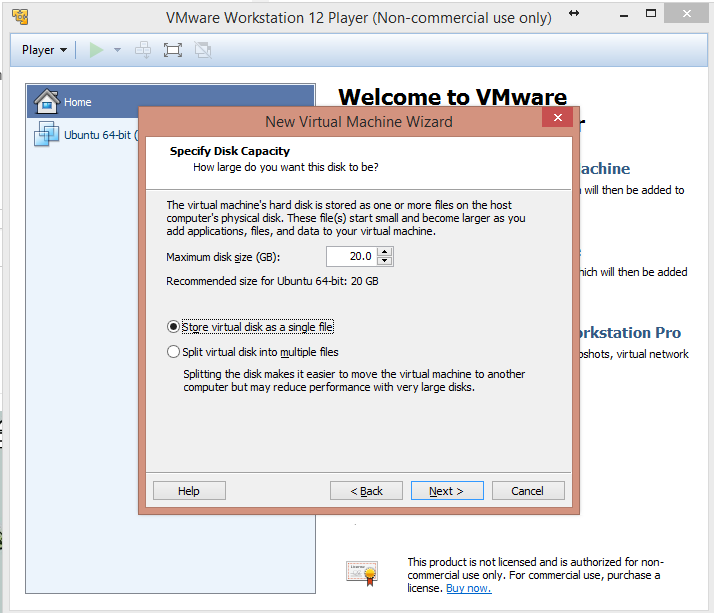 * Click next * Press Customize Hardware * At least 4GB of ram for the VM. FYI, tried 2GB but hit out of memory while building steemd.  * Click Close * Click Finish * VMWare is installing and setting up Ubuntu now * Click OK if you are prompted to install VMware-tools * Wait until you are prompted to login. Enter your username and password # Set Up Your Miner * Follow instructions of [Building on Ubuntu 16.04](https://github.com/steemit/steem/blob/master/doc/building.md#building-on-ubuntu-1604). Be patient. the compilation can take up to an hour. * If you have passed build phase, Congrats! You are almost there! * sudo cp ./programs/steemd/steemd /usr/bin/ * sudo cp ./programs/cli_wallet/cli_wallet /usr/bin/ * cd * steemd * Wait for 30 seconds or so until witness_node_data_dir is created. * Set up the config.ini file now. * nano ./witness_node_data_dir/config.ini * Copy below text at the top of the config.ini: seed-node = 212.117.213.163:2016 seed-node = 185.82.203.92:2001 seed-node = 104.236.82.250:2001 seed-node = 104.199.157.70:2001 seed-node = steem.kushed.com:2001 seed-node = steemd.pharesim.me:2001 seed-node = seed.steemnodes.com:2001 seed-node = steemseed.dele-puppy.com:2001 seed-node = seed.steemwitness.com:2001 rpc-endpoint = 127.0.0.1:8090 miner = ["YourSteemID","5YourPrivatekey"] <--- To find your active private key, find instruction in the next bullet witness = "YourSteemID" mining-threads = 4 * To find your active private key, follow below steps highlighted in the screenshot: 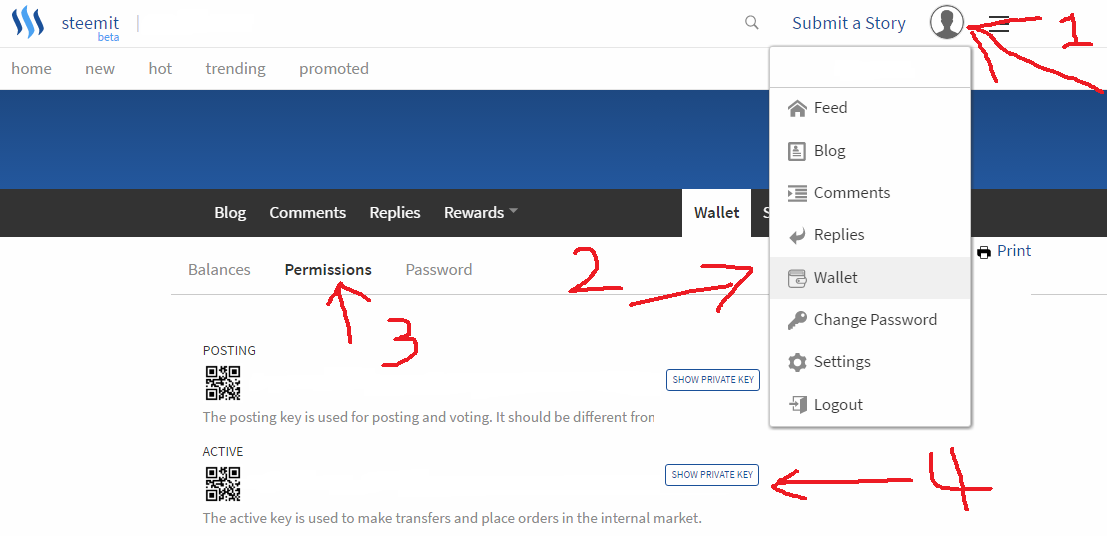 * steemd * You are all set and good luck!