EOS Development For Beginners: WebAssembly
eos·@skenan·
0.000 HBDEOS Development For Beginners: WebAssembly
Many guys are trying to learn how to develop smart contracts on EOS. However, those smart contracts are written by C++ and compiled into WebAssembly which seemed strange to most non-c++ programmers. So before diving deep into the EOS, it’s better to learn some basic stuff about WebAssembly.
<b> What’s WebAssembly </b>
I don’t want to copy the definition from its [official website](http://webassembly.org/). You can take a look at it by yourself. Here you can think it as a file that can be loaded and run in the web browser. It’s similar to the Javascript, but it’s much faster, tinier and safer than JS.
<b> How to write Webassembly </b>
Here is a work flow:
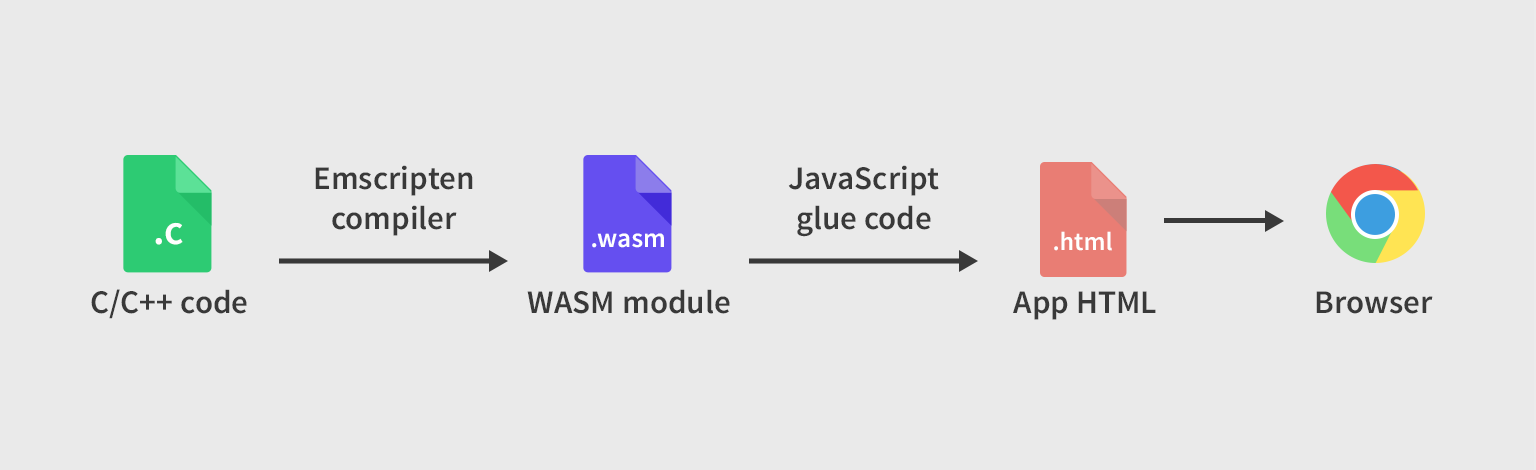
Basically there are four steps, I will go though it by a very simple example.
* <b>1. Write the C/C++ code</b>
The following code is used to calculate the square root of a number.
```
#include <math.h>
float getSqrt (float num) {
return sqrt(num);
}
```
* <b>2. Compile C/C++code into wasm (the format of Webassembly)</b>
There are [many ways](https://developer.mozilla.org/en-US/docs/WebAssembly/C_to_wasm) to compile the code. To simplify the process, I found a very [easy way](https://wasdk.github.io/WasmFiddle/?cvrmt) to do that.
)
Copy your code to that website and click the build button, you can find complied file in the below.
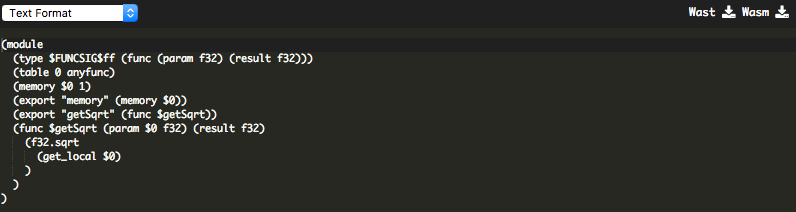
Then download the program.wasm file to your local box.
* <b>3. Load the wasm into browser with JavaScript </b>
Create a test.html using the following code, put it in the same fold as program.wasm
```
<!doctype html>
<title>WASM Test</title>
<script>
fetch('./program.wasm')
.then(res => {
if (res.ok)
return res.arrayBuffer();
throw new Error(`Unable to fetch WASM.`);
})
.then(bytes => {
return WebAssembly.compile(bytes);
})
.then(module => {
return WebAssembly.instantiate(module);
})
.then(instance => {
window.wasmSqrt = instance.exports.getSqrt;
});
</script>
```
* <b>4. Run the method in Web browser </b>
To work around the website cross-origin issues, we need to run a local web server in that folder. With Linux or Mac, let's do
```
python -m SimpleHTTPServer
```
Then open our Chrome browser, go to this page: http://localhost:8000/test.html. In the console, try the following method.
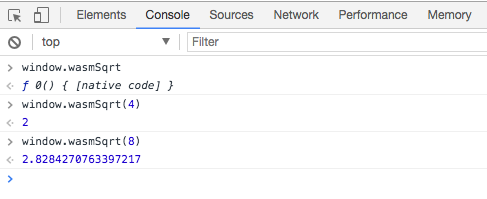
## Done
Through this tutorial, you get familiar with WebAssemply, but for the advanced study, please check [eos-example-exchange-contract-and-benefits-of-c](https://steemit.com/eos/@dan/eos-example-exchange-contract-and-benefits-of-c
) written by @dan
If you are interested in how to build EOS on mac, please check my [previous tutorial](https://steemit.com/eosdev/@skenan/eos-build-guide-on-mac-os).👍 kxp, hkjn, skenan, trogdor, kevlar42, pandorasbox, nationalpark, tinh, jwerner, rawzen, hisea, zenithin, nugob, fureweb, chiel, phial, delans, will.remor, peb35, dmesquita, anne-arkey, coinchain.world, k-omer, fabiovalentino, itsfitts, viterbo, gwpl,