Dart Project - Building a Client Side Tetris Game - Part Two
utopian-io·@tensor·
0.000 HBDDart Project - Building a Client Side Tetris Game - Part Two
 #### Repository https://github.com/dart-lang/sdk #### What Will I Learn? - You will learn how to create the logic for a tetris game - You will learn how to use a Timer to create a game loop - You will learn how to create and manipulate multi-dimensional lists - You will learn how to interface with HTML Canvas in Dart - You will learn how to use iterators to define position and execute game logic - You will learn how to catch keyboard events with Dart #### Requirements ##### System Requirements: - [IDEA intellij](https://www.jetbrains.com/idea/) or [Visual Studio Code](https://code.visualstudio.com/) with the Dart [Plugins](https://dartcode.org/) - The [Dart SDK](https://www.dartlang.org/) ##### OS Support for Dart: - Windows - macOS - Linux #### Required Knowledge - The Dart SDK - A Dart supported text editor ([Dart Pad can be used](https://dartpad.dartlang.org)) - A little time to sit and watch a video and some patience to learn the language #### Resources for Dart: - Dart Website: https://www.dartlang.org/ - Dart Official Documentation: https://www.dartlang.org/guides/language/language-tour - Dart GitHub repository: https://github.com/dart-lang/sdk - Awesome Dart GitHub Repository: https://github.com/yissachar/awesome-dart - Pub website: https://pub.dartlang.org #### Sources: Dart Logo (Google): https://www.dartlang.org/ #### Difficulty - Intermediate #### Description In this Dart Video Tutorial, we finish the Tetris game by adding in the logic to make the game work like a Tetris game. This includes adding event handlers, manipulating HTML canvas, creating background state, defining positional elements and using a random number generator to produce pieces. The game is extendable and a user could add a ton of features to this implementation. #### Interfacing with HTML Canvas in Dart Html canvas is a element in HTML that is used to draw graphics on the fly through scripting. The `canvas` element itself is just the container for the graphics and it comes with an API that allows a developer to build their animations or static pictures. Html Canvas uses contexts to define whether or not the animation will be two dimensional or three dimensional and this context can also be used to draw shapes. <center> 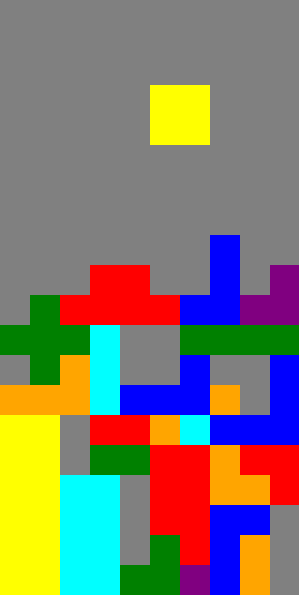 </center> This image shows our game as its being played. Each of the pieces is drawn onto the 300 by 600 pixel canvas by filling in four 30 by 30 pixel tiles. These tiles are then positioned in such a way that they look like one of the seven tetromino pieces. Each piece also contains its own color which makes them distinctive from one another even after they've been stacked together. The user can only control the piece that is falling down the screen until it has hit another piece or hit the bottom axis of the canvas. To make this piece look as though it is moving on the board, we need to paint over it with the grey color of the board and then re-render if with the piece color every 500 milliseconds. #### Modeling the Internal State with Lists The game board for this Tetris game, needs to be modeled with an internal state so that the logic can draw the appropriate images on the canvas element. The easiest way to model the game board is by using a set of Lists. We can use a two dimensional list to model the entire grid of the game board and a normal list to check to see if a row is filled and should be removed. This rule follows the general rule of Tetris; when you fill a row with blocks, that row is removed from the board and the rest of the blocks move downwards. <center> 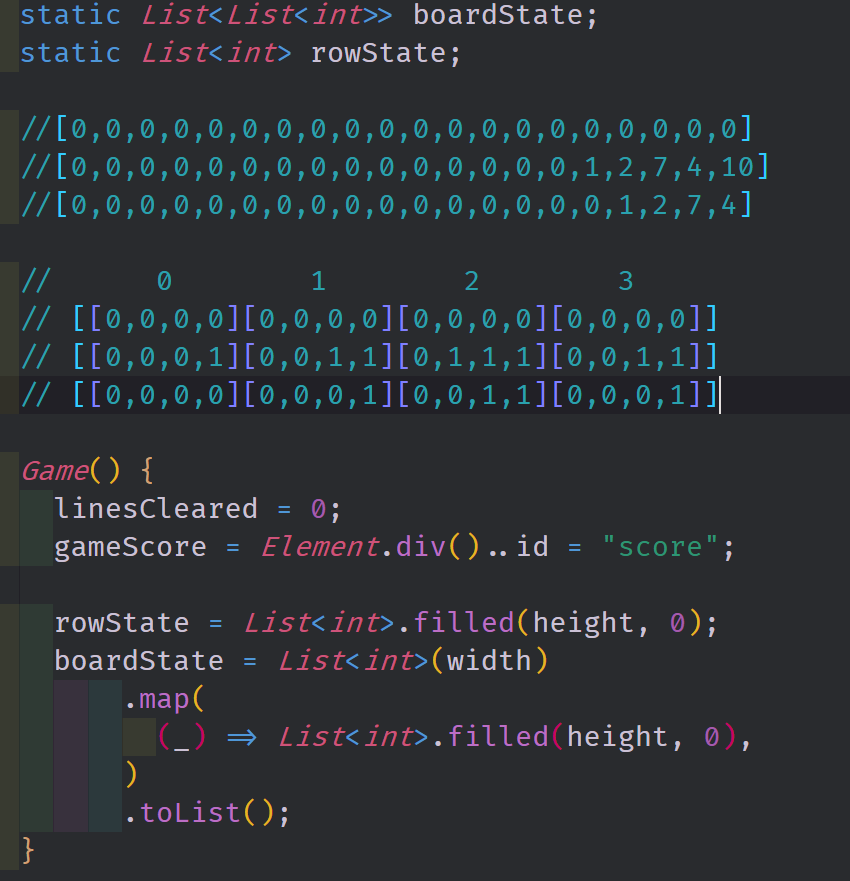 </center> All of the game logic in this implementation of Tetris is held inside of a Game Object. This game object has multiple fields including a `boardState` field and a `rowState` field. The `boardState` field is a 10 by 20 two dimensional list of integers that is initially filled with zeroes. This field works to model the entire game board by adding zeroes to areas where a piece exists. On the other hand, the `rowState` field is a single dimensional list of integers which monitors how many ones appear in every row of the board. When one of the rows has 10 ones inside of it, we remove that row from the game board and then move every other row down one single position. Both of these fields are defined with this initial state inside of the `Game` object's constructor using named constructors and methods from the List class. The Source Code for this video may be found here: https://github.com/tensor-programming/dart-tetris #### Video Tutorial <iframe width="560" height="315" src="https://www.youtube.com/embed/sbEuOf-fLig" frameborder="0" allow="accelerometer; autoplay; encrypted-media; gyroscope; picture-in-picture" allowfullscreen></iframe> #### Related Videos - [Dart Project - Building a Client Side Tetris Game - Part One](https://steemit.com/utopian-io/@tensor/dart-project---building-a-client-side-tetris-game---part-one) #### Curriculum - [A Beginners Guide to Dart - Scope, Iterators, Functional Programming and Collections - Part Six](https://steemit.com/utopian-io/@tensor/a-beginners-guide-to-dart---scope-iterators-functional-programming-and-collections---part-six) - [A Beginners Guide to Dart - Inheritance, Abstract Classes, Interfaces, Mixins and Casting - Part Five](https://steemit.com/utopian-io/@tensor/a-beginners-guide-to-dart---inheritance-abstract-classes-interfaces-mixins-and-casting---part-five) - [A Beginners Guide to Dart - Methods, Final, Static, and Class Inheritance - Part Four](https://steemit.com/utopian-io/@tensor/a-beginners-guide-to-dart---methods-final-static-and-class-inheritance---part-four) - [A Beginners Guide to Dart - Intro to Classes and Objects - Part Three](https://steemit.com/utopian-io/@tensor/a-beginners-guide-to-dart---intro-to-classes-and-objects---part-three) - [A Beginners Guide to Dart - Control Flow and Low Level Compilation - Part Two](https://steemit.com/utopian-io/@tensor/a-beginners-guide-to-dart---control-flow-and-low-level-compilation---part-two) - [A Beginners Guide to Dart - Types, Functions, Variables and Objects - Part One](https://steemit.com/utopian-io/@tensor/a-beginners-guide-to-dart---types-functions-variables-and-objects---part-one)
👍 ydavgonzalez, mercuribot, ezravandi, reazuliqbal, xrp.trail, jacekw.dev, jadabug, steemitri, accelerator, pataty69, hamsa.quality, haleyy7qfwwhite, mariac2601, juliavjza6lewis, emilysx, glownortolor, alexandra5njs2, alyssak, ciedustsouthti, morganam9q0smith, avamqnv2, effofex, luc.real, munhenhos, bhaski, peglesuttseam, victoriau7tp, amosbastian, leir, ulockblock, jaff8, rufans, bestofph, codingdefined, palacios3182, nieloagranca, kendallron, piaristmonk, rantar, espoem, ascorphat, maxpatternman, mops2e, josephace135, drsensor, randomvlogs, criptoanarquista, mcfarhat, jamzed, luisal314, isisfemale, isgledysduarte, veronicacoli, fabielblanchard, arequipa, leviackerman, joanni, lujuria, sam-dmc, smvenezuela, achiron, bawativi, gormogon, thetroublenotes, artistslatam, haiyangdeperci, mindark, zuur, filipino, indayclara, properfraction, statsexpert, dedicatedguy, miniature-tiger, phage93, clayjohn, bachuslib, utopian.trail, techslut, minersean, erikaflynn, jakipatryk, suesa, che-shyr, didic, rewarding, abh12345, walnut1, tykee, silviu93, vishalsingh4997, elear, zoneboy, mcyusuf, gentleshaid, aussieninja, dssdsds, jayplayco, stem-espanol, jk6276.mons, eternalinferno, sargoon, jk6276, mrsbozz, jaxson2011, carloserp-2000, r00sj3, miguelangel2801, emiliomoron, ulisesfl17, tomastonyperez, viannis, erickyoussif, reinaseq, fran.frey, aleestra, lorenzor, tsoldovieri, iamphysical, felixrodriguez, azulear, amestyj, ivymalifred, eliaschess333, yrmaleza, arac, elvigia, luiscd8a, elpdl, josedelacruz, joseangelvs, andrick, yusvelasquez, joelsegovia, jesusfl17, amart29, jrevilla, alfonzoasdrubal, giulyfarci52, wilmer14molina, flores39, lostmine27, eastmael, dalz, alexs1320, scienceangel, alex-hm, eniolw, geadriana, carlos84, ennyta, sandracarrascal, douglimarbalzan, gaming.yer, steem-familia, evangelista.yova, jenniferjulieth, ajfernandez, endopediatria, ingmarvin, alix96, elimao, anaestrada12, yorgermadison, alexjunior, antunez25, haf67, chavas, uzcateguiazambra, asmeira, pfernandezpetit, mgarrillogonzale, rubenp, jeferc, hirally, emynb, eugenialobo, ballesteroj, jcmontilva, rodriguezr, moyam, marbely20, emilycg, darys, balcej, lmanjarres, anaka, benhurg, judisa, juddarivv, mariamo, kimmorales, loraine25, sibaja, steem-plus, steem-ua, newsrx, jjay, ryuna.siege, lordneroo, tdre, mathias240, mandarin2016, utopian-io, tombstone, jga, cryptouno, swapsteem, arbit, tibra, steemstem, dna-replication, alexzicky, praditya, emmanuel293, norbu, rwilday, erikkun28, traviseric, scoora82, alexworld, moniroy, kingnosa, amin-ove, huilco, tuoficinavirtual, faberleggenda, jasonbu, coolbuddy, aalok, mattiarinaldoni, intellihandling, casiloko, cameravisual, donasys, mtfmohammad, pflanzenlilly, mohaaking, delegate.lafona, kevinwong, lemouth, robotics101, alexander.alexis, howo, mayowadavid, sco, rharphelle, kingabesh, de-stem, temitayo-pelumi, bloom, kryzsec, helo, samminator, kenadis, mathowl, terrylovejoy, dexterdev, alexdory, flugschwein, francostem, deholt, stem.witness, abigail-dantes, gra, maticpecovnik, stemng, geopolis, lesmouths-travel, jent, serylt, arconite, mountain.phil28, monie, croctopus, steemzeiger, biomimi, corsica, zonguin, the.chiomz, curie, diebaasman, pinksteam, trixie, hotsteam, reaverza, chrisluke, cryptokrieg, aboutyourbiz, morbyjohn, nitego, zipporah, qberry, schroders, zest, moksamol, stahlberg, positiveninja, neumannsalva, drmake, whoib, vact, yaelg, locikll, anwenbaumeister, hendrikdegrote, blewitt, lekang, allcapsonezero, thehulk07, mahdiyari, sku77-poprocks, lamouthe, peaceandwar, miroslavrc, yestermorrow, anthive, gpcx86, angelica7, wackou, mammasitta, jiujitsu, combatsports, gribouille, longer, robertbira, rival, massivevibration, meq, yomismosoy, goodway, kafupraise, wargof, guga34, ivan-g, oghie, yashshah991,