Clive Updates - final part bindings in the TUI
hive-139531·@thebeedevs·
0.000 HBDClive Updates - final part bindings in the TUI
This release completes our work on bindings. We have made many small improvements to make using Clive TUI more convenient. We have also simplified the use of the update authority operations in CLI. We hope you will like the changes. In addition, we’ve been busy working on technical issues: we updated Schemas (used Schemas internally for working with operations), Wax, Beekeepy and Textual (the TUI framework), which required extensive testing and code adjustments. As a result, Clive CLI is now faster, although there’s still more work to be done. ### Adding global bindings to the bottom menu The global bindings work across many views. Compared to the previous version, we have added two new bindings: `lock wallet` and `switch a node`. So now, the following global bindings are available: `?` - help `Ctrl+x` - clear notifications `Ctrl+d` - go to the dashboard (available in unlocked mode) `Ctrl+o` - load a transaction from a file (available in unlocked mode) `Ctrl+l` - lock a wallet (available in unlocked mode) - newly added `Ctrl+s` - go to settings (profile configuration) (available in unlocked mode) `Ctrl+n` - switch a node (available in unlocked mode and during profile creation) - newly added `Ctrl+t` - go to the transaction summary (cart) (available in unlocked mode) `Ctrl +p` - open the palette `Ctrl+q` - quit The bindings: `lock wallet`, `go to the transaction summary`, `go to the dashboard` and `go to the settings` are very useful and frequently used. Therefore, they are added to the bottom menu. 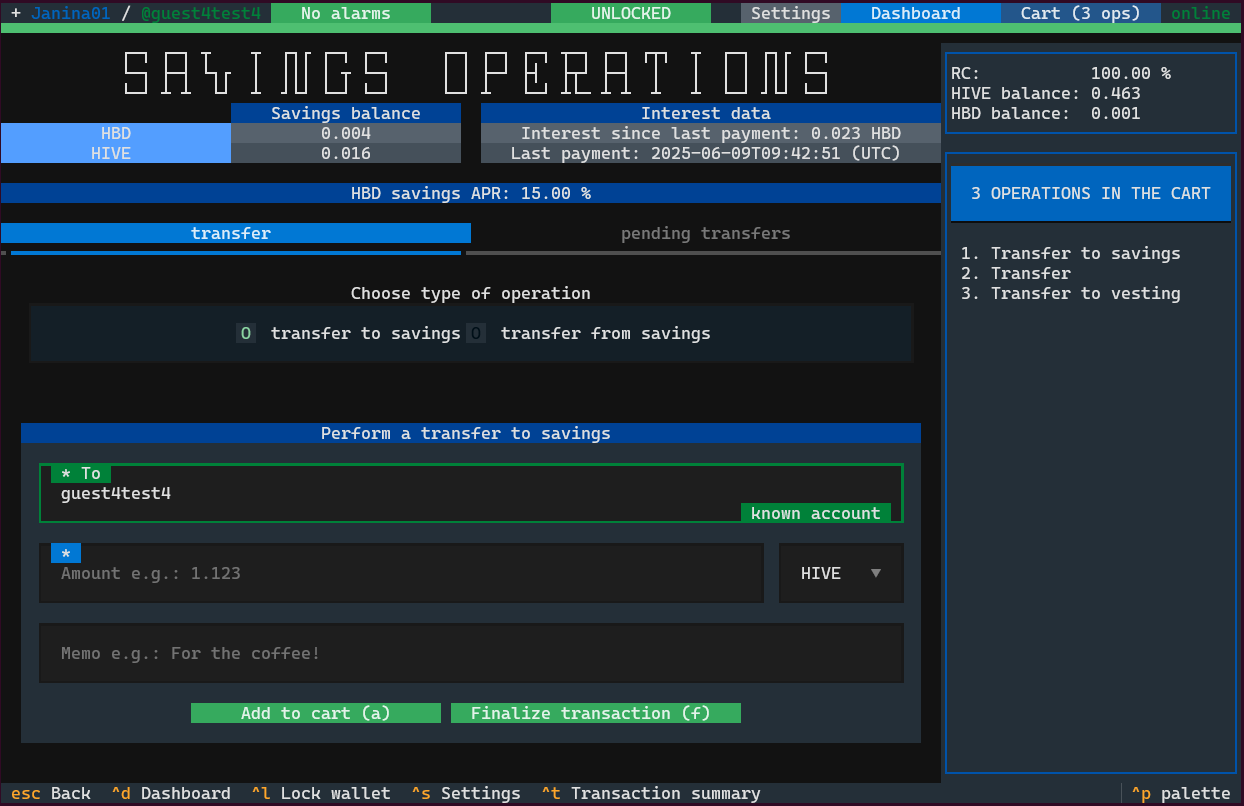 ### Context bindings for account management in the dashboard We have added context binding for removing accounts from the dashboard (`r`) and for viewing details (`d). These bindings apply to the highlighted account and they are also visible in the bottom menu. 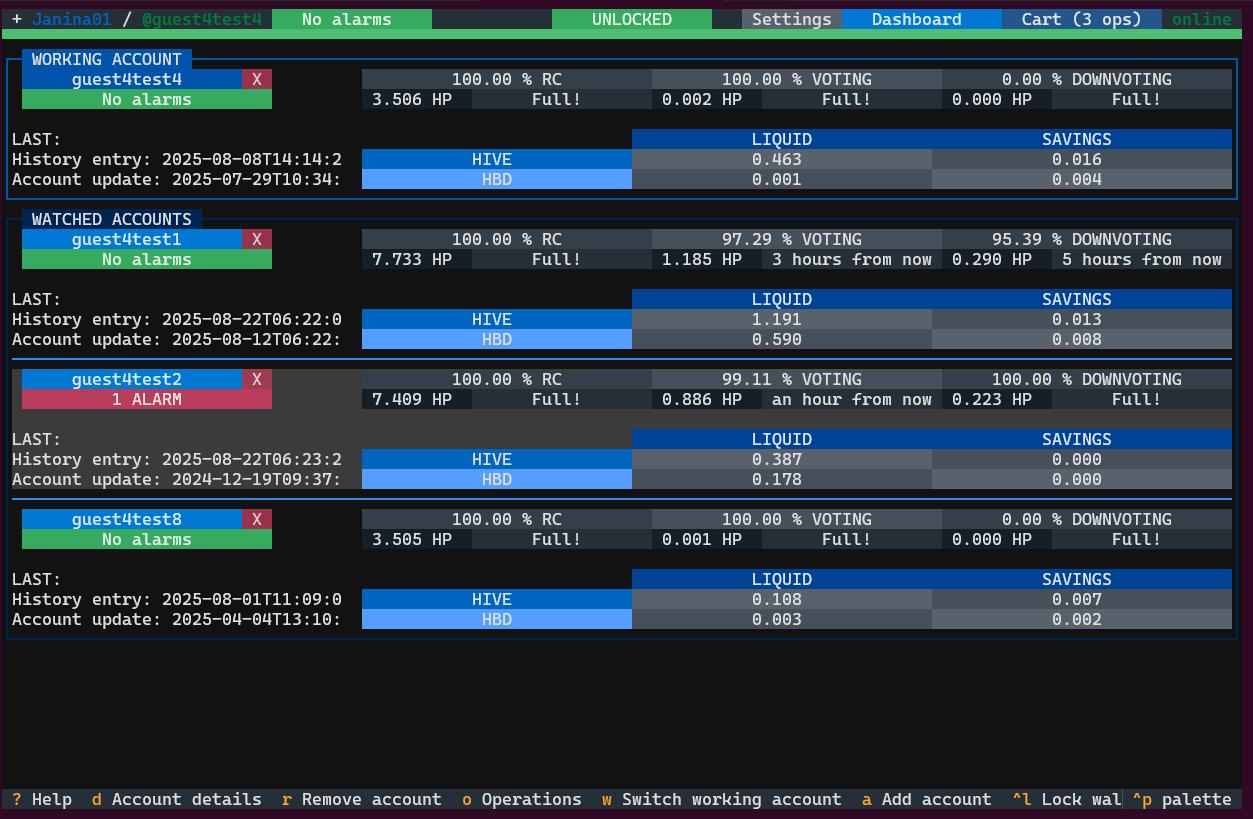 ### Improvements that make TUI easier to use We get used to certain basic behaviours in applications that we expect, even when it is an application in a terminal like Clive. We have implemented these smaller features such as: - Navigate using the arrow keys in the button list on the `Operations` and `Settings` - Navigate using the arrow keys through rows and columns in tables - Highlight currently focused row in the tables - Added missing but useful buttons (`Add new alias`, `Load from file` - during the onboarding process) 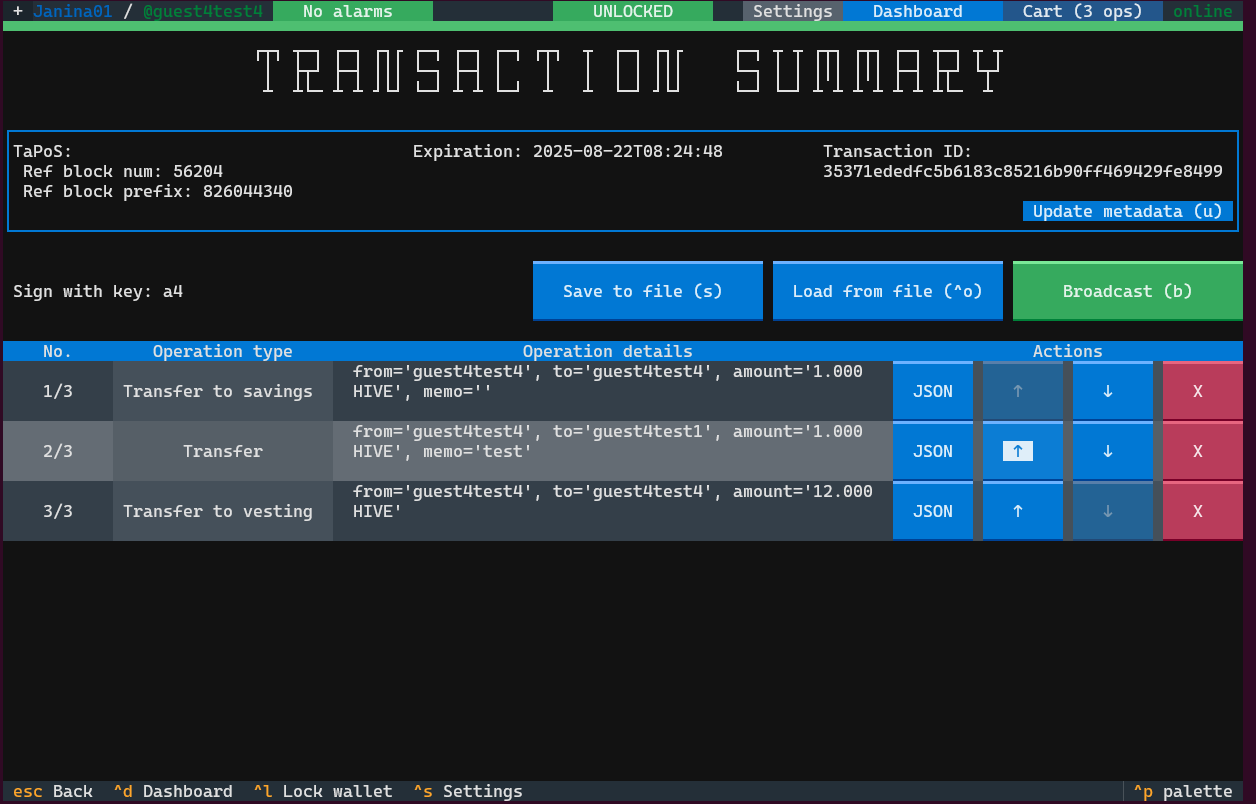 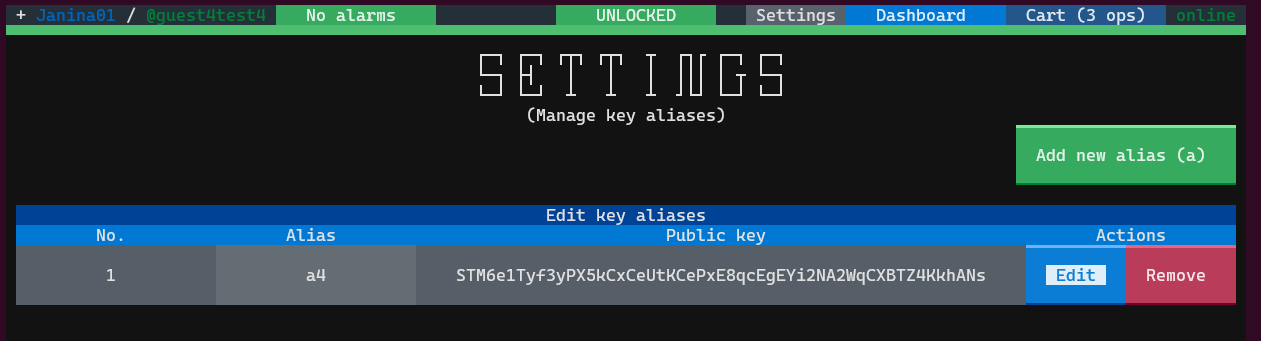 ### Change the execution directory We have added a new mapped folder called `mapped_host_directory` inside the '.clive/` folder on the host. This folder is created when you use the scripts to start Clive. You can use it to transfer data between the host and Docker. By default, your transaction will be saved in this folder. You can also load a transaction or a private key from this directory. 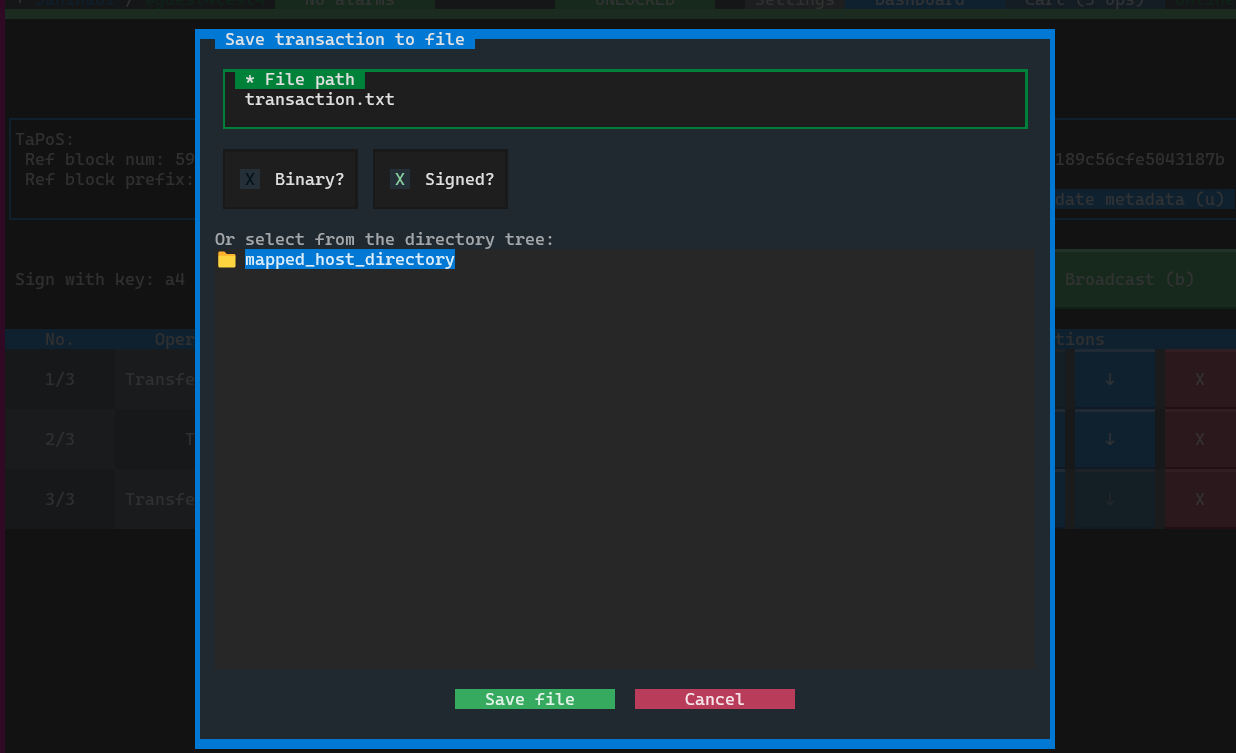 Clive CLI also starts now in this folder.  ### Simplified the most sophisticated command in CLI - update authority The commands for updating authorities include subcommands, options and common options. To make them easier to use we have relaxed the command’s strictness: - the common options `--sign` can now be used with any subcommand even at the end of the command. However it can only be used once. 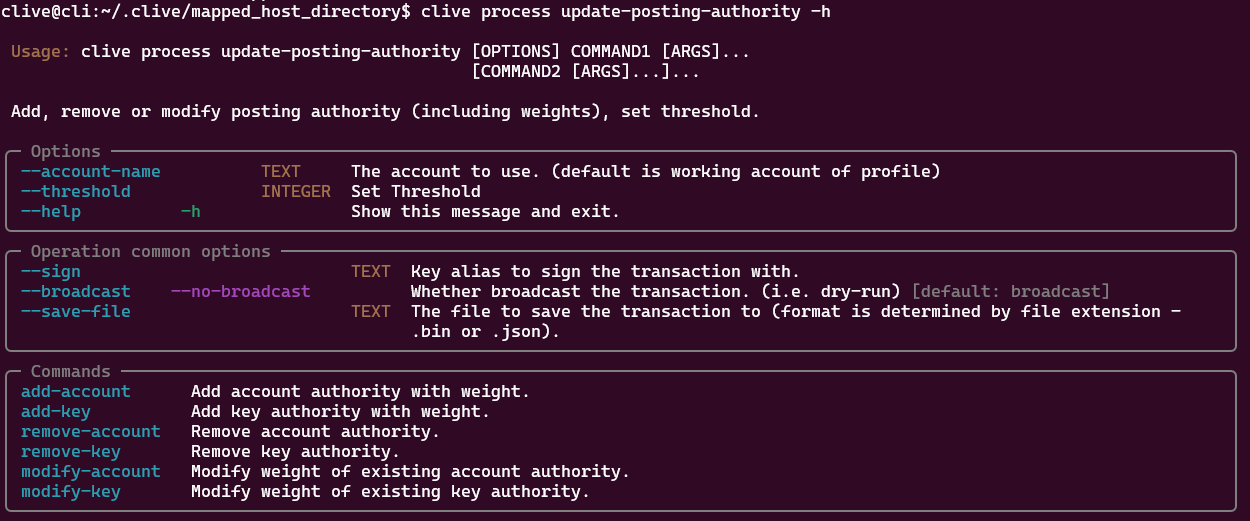 Please be aware that commands have its own help and options: 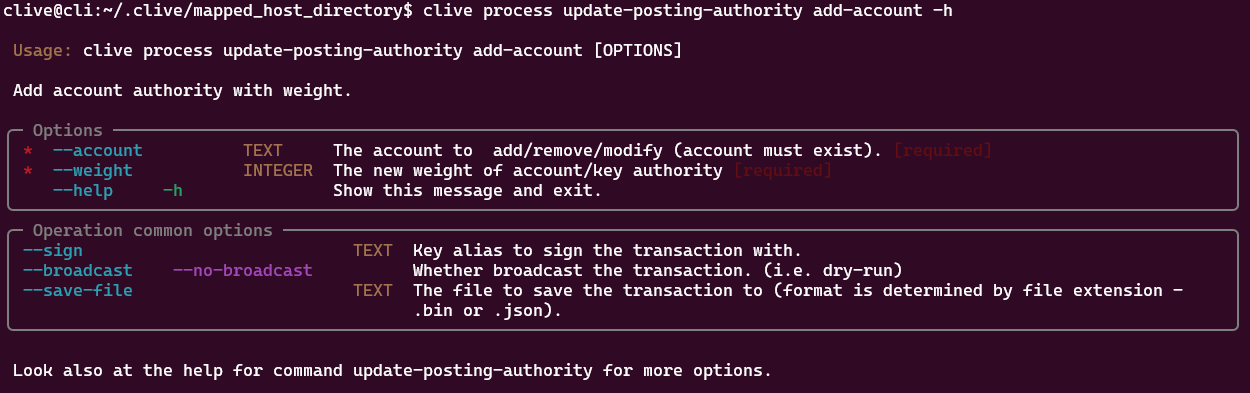 ##### Examples: User `alice` wants to update the posting authority. She wants to change the threshold from 2 to 1, remove `mary` and add `bob`. Posting authority of `alice` before updating  Command: ``` clive process update-posting-authority --threshold 1 add-account --account bob --weight 1 remove-account --account mary --sign alice_key ``` 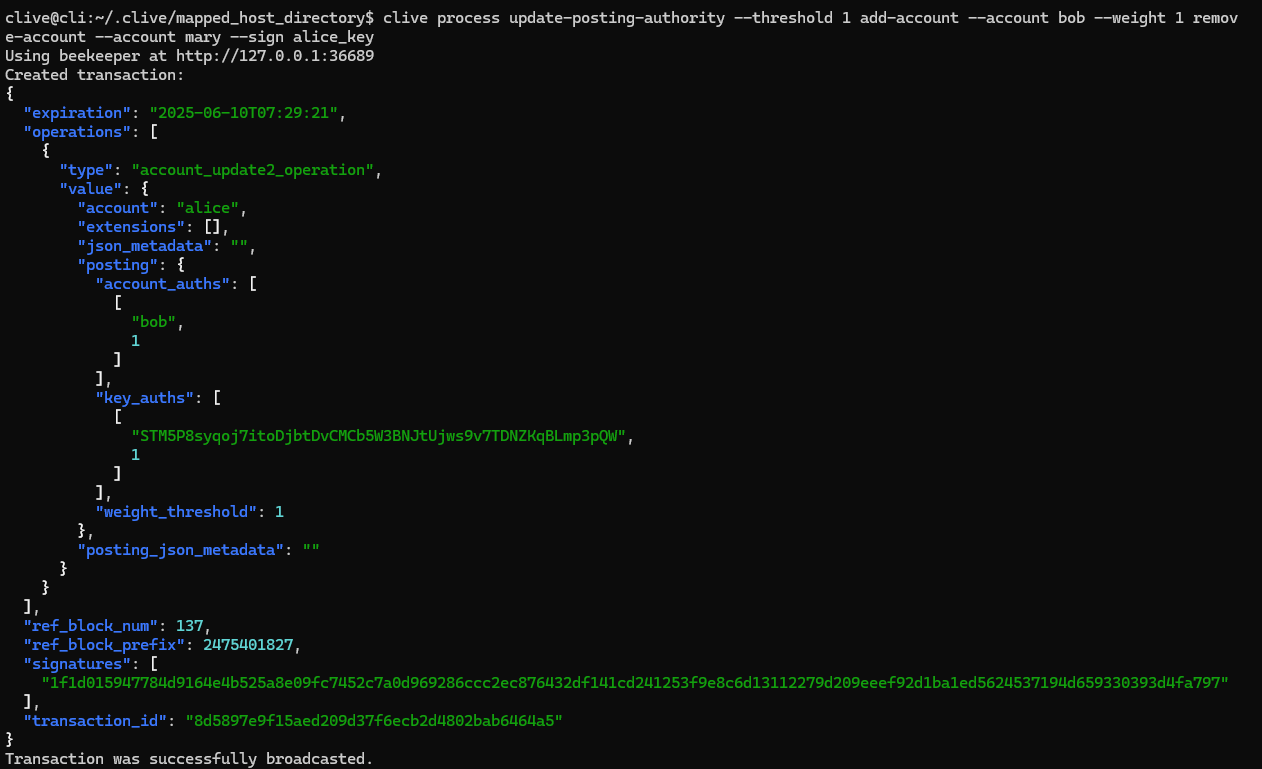 Posting authority of `alice` after updating  [Complete list of corrected issues](https://gitlab.syncad.com/hive/clive/-/releases/v1.27.11.6) The scripts that allow you to run Clive are here: https://gtg.openhive.network/get/clive/ ### Your feedback is invaluable and always welcome.
👍 digital.mine, cocaaladioxine, iamcyril, niallon11, gtg, justinw, techslut, joeyarnoldvn, voitakjewelry, ecencypoints, bilginhilal, menzo, letusbuyhive, penguinpablo, cryptonized, funnyman, alphacore, hungrybear, bilpcoinbpc, jacuzzi, thebeedevs, mtyszczak, hivebeecon, itsola, small.minion, fwaszkiewicz, tommyl33, withdraw, aafeng, ecp.dump, sprunk, ecp.voter, ecp.curator, thevil, spoondawg, condeas, linuxbot, travoved, ssekulji, russia-btc, mcfarhat, blocktrades, htotoo, fatman, votehero, eturnerx-dbuzz, eturnerx, voter002, msp-makeaminnow, memepress, tdas0, goodcontentbot, krrizjos18, liveofdalla, javedkhan1989, itinerantph, rt395, sayee, petrolinivideo, tomatom, kgakakillerg, marblely, bilpcoinrecords, bilpcoin.pay, arunbiju969, creodas, astrocat-3663, empo.voter, iambril, arshadkhan4421, bpcvoter3, marblesz, lbi-token, trumpman2, no-advice, gabrielatravels, auracraft, minerspost, celinavisaez, ykroys, iamleicester, freedomring, killerteesuk, techcoderx, adulruna, deggial, magic.byte, angelina6688, trafalgar, kaykunoichi, raindrop, silversaver888, traf, artefactoestudio, ridwant, gaposchkin, agungprasetyo, kattycrochet, bitcoinflood, atongis, el-dee-are-es, franzpaulie, tzae, andablackwidow, hylene74, gduran, acidyo, hivebuzz, holbein81, xves, juanvegetarian, ghaazi, rendrianarma, tillmea, dreeyor, chydolar1, lizanomadsoul, manncpt, jnmarteau, pinmapple, roelandp, discovereurovelo, fronttowardenemy, princessmewmew, xsasj, itchyfeetdonica, greddyforce, musicandreview, guitarmcy, kimzwarch, rubelynmacion, darine.darine, kiemurainen, meltysquid, social, ukulima, ubasi, txerritxoa, zhaoyiseng, onelovedtube, hive-134220, silasvogt, gaborockstar, bishoppeter1, happymichael, originalmrspice, mrchef111, darkfuseion, gisi, illuminationst8, joeytechtalks, brettblue, toddmck, melor9, icepee, dlike, cowboysblog, eternalsuccess, iamangierose, gabrieljr, reyn-is-chillin, techstyle, aletoalonewolf, gabbyg86, humanearl, arcange, sniki003, achimmertens, laruche, calebmarvel24, walterjay, felt.buzz, orlandumike, neeqi, sku77-poprocks, crowbarmama, brainpod, smacommunity, olaunlimited, st3llar, adventuroussoul, jeronimorubio, raoufwilly, shermanedwards, gray00, amymya, openmind3000, egistar, roozeec, tonysayers33, aperterikk, miosha, ericpso, photographercr, nurul-uli, wend1go, tht, votebetting, rufruf, rus-lifestyle, hivebuilder, fw206, woelfchen, hive-echo, coldbeetrootsoup, bambukah, hive-132595, dovycola, like2cbrs, cbrsphilanthropy, setpiece, wanderelle, sarunya, nataya, surachai, teerawith, spiritabsolute, oflyhigh, wherein, jenniebaby, cnstm, likuang007, lianjingmedia, adm, bilpcoinbot, unpopular, belemo, joshman, belemo.leo, pappyelblanco, zerofive, foxkoit, starrouge, sopel, a-quarius, bridgeless, glideglobe, marilui91, lucashunter, sirsmokesalot96, nathen007, grindle, littlebee4, kstop1, passion-fruit, fortune-master, floatinglin, queercoin, henrietta27, amakauz, leopull, cagolistic, evildeathcore, savioureffiong, a07, kriang3teejoe, urun, soumaren, otsoak, borran, thrasher666, nevio104, fengchao, themonetaryfew, haikurator, silingsi, shayaiykram, vaibhavrawat, dreaded-gamer, santigs, softworld, springlining, hyhy93, joanm897, web3creative, bibana, victoradebiyiart, atf-sentinel, valentin86, hive-152804, smallboost, archives-upfunds, ernestopg, debbie-ese, cross-fit, kachy2022, chetanpadliya, ace108, irynochka, nj07, captaindingus,