OBSIDIAN - A Writing App Every Blogger Must Have
hive-148441·@geekgirl·
0.000 HBDOBSIDIAN - A Writing App Every Blogger Must Have
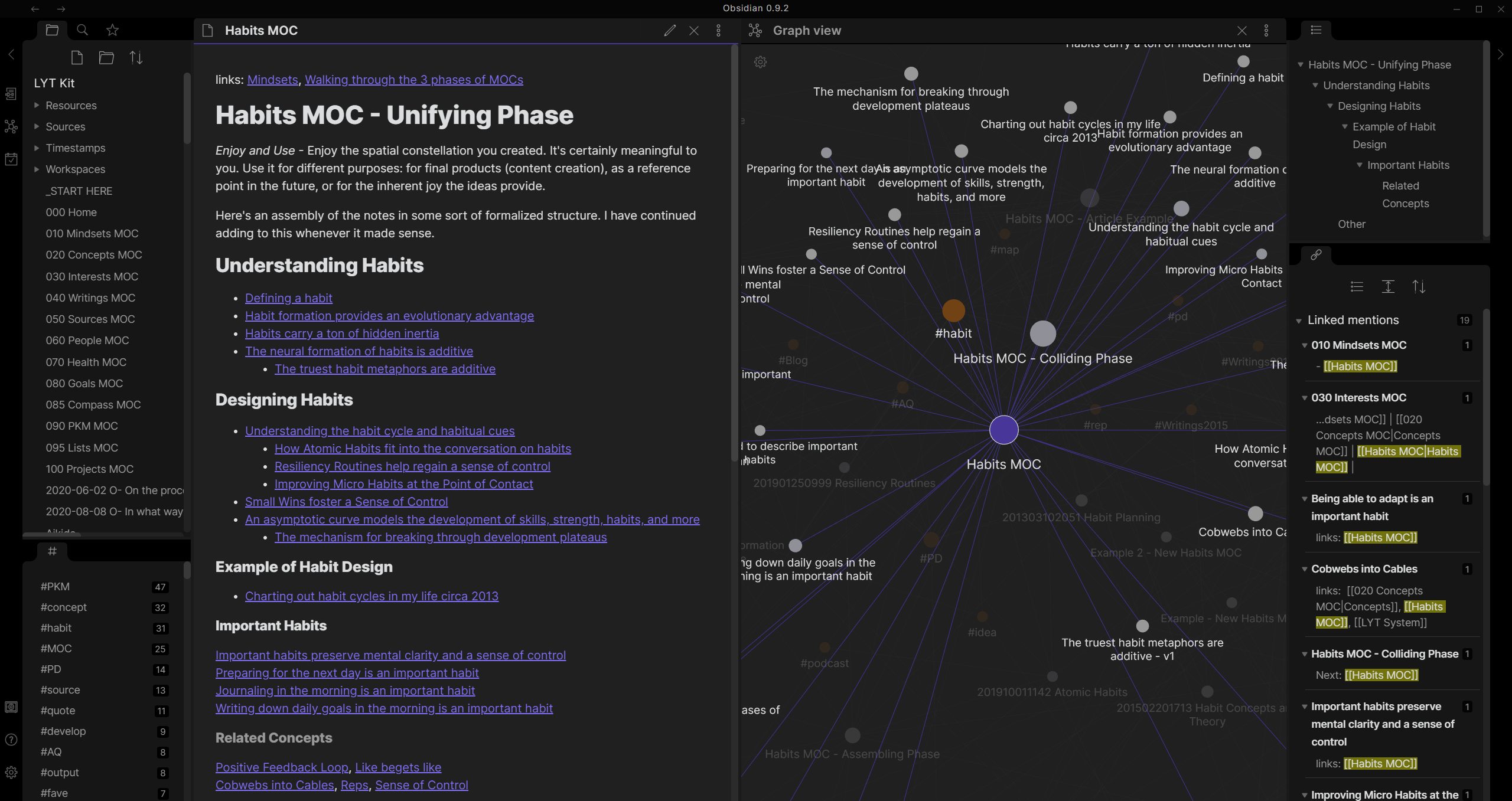 I have used several writing editors in the past and was never able to find the one I really liked and used for a long time. I was able to find a coding editor, and Visual Studio Code has become my default code editor a while ago. When it comes to writing posts, articles, or simple notes, my search hasn't been as lucky until I discovered [Obisidan](https://obsidian.md). Before Obsidian I would end up using simple text editors like TextEdit on Mac, and Notepad on Windows. That is because there was an alternative I liked. I have tried many differed paid apps as well. But for some reason I would go back to TextEdit or Notepad. Recently, I discovered Obsidian and I am super impressed with what it does. I haven't even explored all of its features yet. I am sure I will learn more about its features as it is becoming my default app for anything text. My primary devices are made by Apple, and I do like using Notes app for quick notes and I like how these notes automatically become available on all of my devices. However, I never have seen a need to use Notes app for writing longer content like posts, articles, ideas, documents, etc. And Notes have always played a special designation of quickly looking up things, rather than building a knowledge base. Building a knowledge base is what Obsidian is offering by keeping various notes and ideas separate and linked together at the same time. Linking notes is one of the powerful features of Obsidian. It also provides ability to visualize how these notes are linked with each other. But this is not what attracted my attention about Obsidian. I was looking for a simple markdown editor without noise, that can help with organized and focused writing experience. I also was looking for a feature that would automatically make all these writings available in other devices like phones, laptop, and desktops. Obsidian does have all these features. Obsidian has apps available for iOS and Android devices, and it also has apps available for macOS, Windows, and Linux machines. I tried apps for an iPhone and an iMac. Both worked great. To start out we don't need all these fancy features. After all, we just want to write without distraction. It doesn't have two windows where one windows would show text with markdown tags and the other shows how the writing would look like when published. There is no need for two windows. We can see both in one simple windows. Markdown tags are visible when editing, otherwise text displayed with applied markdowns. While themes and colors are customizable, the default theme is dark and works great. Developers have done a great job making the app work as intended from the very start with very little effort in initial configuration. One feature I really wanted to have in any writing app is ability to switch devices and continue the writing on any other devices. I couldn't figure this out right away. Because one confusing thing about Obsidian was that they offer an add-on paid feature called Sync. Syncs costs $8 a month and as the name suggests it would sync works on multiple devices. That seemed strange and overpriced for a simple feature. There had to another way and there is. In fact, Obsidian itself does provide the solution to sync vaults across all devices without using the Sync. We can achieve this by using other cloud services we already use. In my case it is iCloud. In Obsidian we can create vaults where all the notes and writings are kept organized. The trick to make these vaults available on other devices as well was creating a vault using iCloud Drive. In other words the vault uses iCloud Drive as the path to store the files in. I did just that on my iPhone first. Then I opened the same vault in my Obsidian app on iMac. And all the notes appeared without any issues. Now I should be able to open this vault and its contents on any of my devices that use iCloud Drive. I believe the same can be achieved for those who use other cloud services like One Drive, Google Drive, etc. Obsidian does have paid plans for commercial use. However, anybody can use Obsidian for free for personal use. There is no need to create an account or sign up. This free option also gives access to plugins, API, and community support. It does look like they have a growing community. It is great to see communities built around great platforms and ideas that are built to provide real benefits. While Obsidian is 100% free to use for personal use, it does have a paid *Catalyst* option, which is mainly meant to support further development. It is a one time fee of $25+, and comes with early access to insider builds, special badges in the community and access to exclusive dev channel. That is actually a great model. Looks like developers have chosen to give away this awesome app for free, and also open to accept support from the community if they choose to. Obsidian is also built with privacy in mind and all of our files live in local folders and users have the full control of their content and don't have to worry about losing their data because of some cloud service shuts down or decides to decline services. Even when using their Sync feature, they still provide privacy of keeping files in local folders and encrypting all data when syncing with other devices. Obsidian can be used for many purposes. It can be used for simple to-do tasks, quick note taking, writing articles, working on business documents, or even writing books. What is really cool about it, it empowers all writers with a tool that connects their notes and ideas. These notes and ideas can later be visualized and used for improvements. We can link to other notes with new ones and they appear in the new note without a need to rewriting them. If we want to take quick daily notes there is calendar button that creates a new note with the current date. I think it is cool too, for daily tasks and to be able to look back in the future and find notes quickly. Both mobile and desktop versions are designed to be effortless regardless which one we are using. For example, the mobile version has special row with buttons that represent certain actions that can be done quickly while taking notes, writing documents or articles. We are also able to add images to our notes. The more I use Obsidian, the more I like it. Feel free to visit [Obsidian](https://obsidian.md) website to learn more about it and see if this is something you would find useful. If already an Obsidian user let me know your experiences in the comments.
👍 solominer, curatorwhale, sciencevienna, dyptre, shaka, mochita, harkar, brocfml, recoveryinc, samrisso, tomtothetom, cugel, mawit07, bearjohn, liz.writes, stemcur, zuun.net, tuck-fheman, kevinwong, joeyarnoldvn, sportsgeek, musicgeek, marketinggeek, movement19, tsurmb, sophieandhenrik, coinomite, mktmaker, logicforce, dying, mrwang, arconite, nurhayati, smartvote, positivum, maakue, gerber, ezzy, exyle, steem.leo, mice-k, dcityrewards, unlockmaster, reazuliqbal, daan, iansart, shitsignals, jeanlucsr, felander, unconditionalove, bestboom, steem.services, nateaguila, linco, dlike, followjohngalt, cakemonster, determine, mfblack, triplea.bot, tiffin, beta500, ribary, dpend.active, sketching, jelly13, hivechat, dcrops, mcsherriff, blewitt, lestrange, ebargains, anna89, poliwalt10, roleerob, proofofbrain, privex, diggndeeper.com, abh12345, karja, heidimarie, jayna, abitcoinskeptic, philnewton, tobias-g, misterengagement, mattbrown.art, abh12345.cards, isabel-vihu, mallorcamum, idakarlsen, holoferncro, sanjeevm, lordb, czera, alphacore, firinmahlazer, cornerstone, z3ll, fknmayhem, digital.mine, acantoni, molometer, crookshanks, bro-poker, plusvault, mangos, chorock, penguinpablo, delso, cryptonized, themanny, jedigeiss, funnyman, hungrybear, piotr42, fulltimegeek, lynds, hanshotfirst, backinblackdevil, leeyh2, techslut, enjar, darthgexe, doze, davidlionfish, beeyou, magicmonk, lemouth, isaria, coolguy123, fourfourfun, enjargames, yieldgrower, ats-david, clayboyn, whangster79, ginnungagap, macksby, zarnoex, labyrinths, patronpass, tryskele, forykw, meanbees, hive-data, forkyishere, egonz, teamashen, haitch, mirel0510, gallatin, josevillanueva, pladozero, samujaeger, sevenoh-fiveoh, alexpmorris, ampm, borran, offgridlife, domo, thrasher666, curationvoter, michellectv, slobberchops, leomolina, andrastia, cconn, tomwafula, minerspost, darkpylon, xg4028, jhelbich, pepitagold, mraggaj, hive.friends, no-advice, kurkumita, gamersclassified, daveks, artonmysleeve, joseda94, coininstant, aafeng, tcpaikano, abrahan414, soyrosa, nthtv, abh12345.stem, slider2990, cd-stem, dorkpower, juecoree.stem, oflyhigh, wherein, lnakuma, celeste413, cnstm, likuang007, lianjingmedia, nickydee, babytarazkp, katherine-w, samantha-w, steempty, htotoo, xsteempty, zerofive, apshamilton, hamismsf, yaelg, jpbliberty, starrouge, videoaddiction, amberkashif, vyb.curation, dwinblood, richardcrill, flamistan, funshee, khoola, crazygirl777, steemexperience, dalz.shorts, vyb.pob, topbooster, uwelang, sillybilly, leprechaun, cocaaladioxine, bengy, fernandosoder, prinzvalium, yulilemus02, v4vapid, primeradue, xianlaiyiju, chinchilla, davidesimoncini, blind-spot, zdigital222, appreciator, detlev, lenasveganliving, x30, sunsea, inciter, mobi72, josehany, discoveringarni, lucianav, noalys, hexagono6, aprasad2325, wendy0520, bluemist, samostically, marblely, zeesh, actioncats, cielitorojo, elgatoshawua, fotomaglys, marblesz, xappreciator, antisocialist, coolsurfer, kattycrochet, vancouverdining, sekani, goldcoin, theshaki, beerlover, callmemaungthan, karmaa13, leaky20, binkyprod, kriszrokk, dewamke44, lionsuit, violator101, selfhelp4trolls, santigs, softworld, snook, wulff-media, pocketrocket, momins, xarabista, vikisecrets, irenicus30, cryptomaniacsgr, banzafahra, zoidsoft, ash, mightpossibly, fredhill, tamaralovelace, cryptobeautiful, dafusa, sofs-su, generosesity, mireyalara, stefano.massari, bluerobo, blue-witness, he-index, blainjones, elianaicgomes, cbridges573, dml28, kaelci, linita, evildeathcore, bahrizul, jakiro12, howzat, long888, tzae, farpetrad, vikbuddy, ikrahch, anna-newkey, daltono, elderson, flowerbaby, mayor333, fw206, helmibireuen, bashadow, nazomimatute1998, shinoxl, madamnaomi, chops316, silverd510, chris-uk, alidickson, andablackwidow, oilprinzz, glosique, chinito, mytechtrail, jphamer1, nnaraoh, innerwebbp, cryptokungfu, newsflash, petrolinivideo, gabrielatravels, manniman, fitnessgourmet, patlog, razorshark, marvinman, money.finance, mannimanccadm, fixie, reetuahlawat, ace108, kkarenmp, joydukeson, mrsyria, shainemata, shortshots, arminius3301, abkevwe, wrestlingdesires, deanliu, oponliworks, name0, sweetest, yakubenko, zpzn, mattsanthonyit, gaurav.art, drniche, fernwehninja, titusfrost, limonta,